
Picayune, MS · Pearl River County
Affidavit to Request Warrant Cancellation or Charge Dismissal
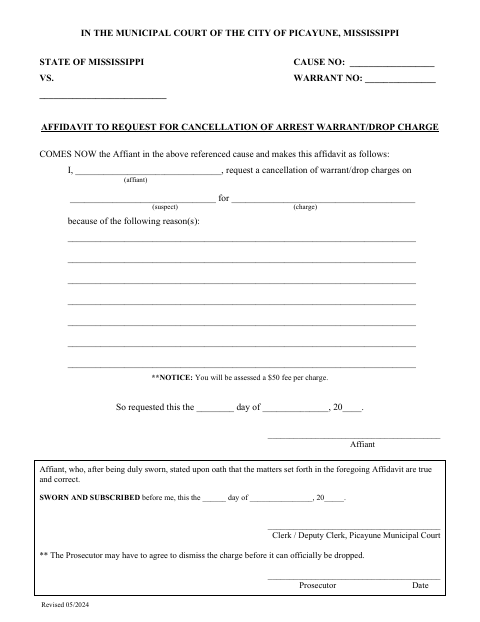
This sworn affidavit lets an affiant ask the Picayune Municipal Court to cancel an arrest warrant or drop a charge, with space to identify the case, explain the reason, and sign under oath.
- licensed online notary
- ~15 min average
- Notarized PDF emailed
What you’ll need
- Government-issued photo ID
- Webcam-enabled device (laptop or phone)
- This form, ready to upload as a PDF
What this form is
Use this form to ask the Picayune Municipal Court to cancel an arrest warrant or drop a charge in a specified cause. The affiant identifies the suspect and charge, gives reasons for the request, and swears that the statements are true and correct. The form notes a $50 fee per charge and that the prosecutor may need to agree before a charge is officially dropped.
Who needs it
An affiant seeking cancellation of an arrest warrant or dismissal of a charge in a Picayune Municipal Court case uses this form to state the request and its reasons.
How to get this notarized
- 1
Download the Affidavit
Get the Request to Drop/Cancel Charges affidavit from the City of Picayune.
- 2
Fill In the Case Details
Enter the cause and warrant numbers, affiant and suspect names, charge, and reasons for the request.
- 3
Book an Online Notary
Arrange an appointment with a commissioned online notary and ask about any identification or document requirements.
- 4
Sign Under Oath on Video
Appear for the online notarization, take the required oath, and sign as directed by the notarial officer.
- 5
Submit It to the City
Submit the completed affidavit to the Picayune Municipal Court and check on any fees or prosecutor approval.
Preview the form
The blank PDF straight from Picayune. Look it over, then upload your filled copy to start the notary session.

You’ll need ID and a webcam.
A licensed online notary will join you on video, verify your government-issued ID, witness your signature, and apply their seal. You’ll receive the notarized PDF by email when the session ends.
Frequently asked questions
- How do I request warrant cancellation or charge dismissal?
- Complete the case, warrant, suspect, charge, and reason fields, then swear to and sign the affidavit before a notarial officer. Submit it to the Picayune Municipal Court and confirm any filing steps.
- Do I need to sign this affidavit before a notary?
- The form includes a sworn-and-subscribed jurat requiring the affiant to swear that the statements are true and correct before the notarial officer.
- Can I use a commissioned online notary for this form?
- Mississippi requires its own notaries to meet signers in person and has not authorized online notarization for Mississippi notaries. Mississippi recognizes qualifying notarial acts performed by authorized officers of another state under Miss. Code §25-34-23; confirm with the city or chancery clerk if unsure.
- Will submitting this form automatically drop the charge?
- No. The form says the prosecutor may have to agree before the charge can officially be dropped. It also states that a $50 fee will be assessed per charge.