
Excelsior Springs, MO · Clay County
Retail Liquor License Application
This application requests a retail liquor license and collects business, ownership, premises, and background information from a sole owner, partners, or managing officer seeking to operate a licensed business.
- licensed online notary
- ~15 min average
- Notarized PDF emailed
What you’ll need
- Government-issued photo ID
- Webcam-enabled device (laptop or phone)
- This form, ready to upload as a PDF
What this form is
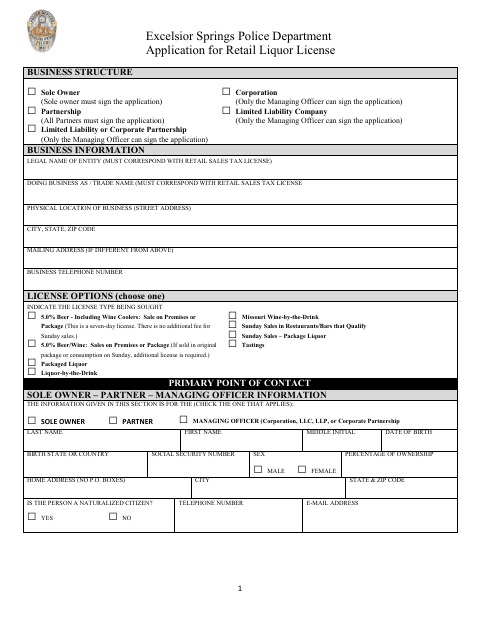
The application asks the applicant to select a license type, identify the business and its owners or officers, describe the premises, and answer questions about finances, ownership interests, and licensing history. The sole owner, all partners, or managing officer must review and initial the affirmations, then sign the sworn statement. The form says an approved application must be presented to the Excelsior Springs City Council for final approval.
Who needs it
A sole owner, all partners, or the managing officer applying for a retail liquor license for a business in Excelsior Springs needs to complete and sign this application.
How to get this notarized
- 1
Download the Application
Download the six-page Retail Liquor License Application from the City of Excelsior Springs.
- 2
Complete the Form
Enter the business, ownership, license, premises, and questionnaire information. Have the required owner, partners, or managing officer review the affirmations.
- 3
Book an Online Notary
Schedule a remote appointment with a commissioned online notary for the sworn signature section.
- 4
Sign on Video
Show identification, take the oath, and sign when instructed during the online notary session.
- 5
Submit to the City
Submit the completed application as directed by the city. If approved by the Liquor Control Officer, the form says it goes to the City Council for final approval.
Preview the form
The blank PDF straight from Excelsior Springs. Look it over, then upload your filled copy to start the notary session.

You’ll need ID and a webcam.
A licensed online notary will join you on video, verify your government-issued ID, witness your signature, and apply their seal. You’ll receive the notarized PDF by email when the session ends.
Frequently asked questions
- Who must sign the retail liquor license application?
- The form says the sole owner must sign for a sole proprietorship, all partners must sign for a partnership, and only the managing officer signs for a corporation, LLC, or listed corporate partnership.
- How do I get the application notarized online?
- Complete the application, then book an online appointment with a commissioned online notary. The signer appears by video, takes the oath, and signs as directed. Missouri authorizes remote online notarization for its own notaries under RSMo §486.1100 to §486.1205.
- Do I need to notarize every owner's signature?
- The form requires the sole owner, all partners, or managing officer to sign, and its notary section certifies that the signer or signers subscribed and swore to the application. Follow the form's signature requirements for your business structure.
- What happens after the application is approved by the Liquor Control Officer?
- The form states that, if approved by the Liquor Control Officer, the application is to be presented to the Excelsior Springs City Council for final approval. Confirm any submission details with the city.
- Can I sign the application before my online notary appointment?
- The application includes a sworn statement and a subscribed-and-sworn notary block. Wait to sign until the commissioned online notary instructs you during the video appointment.
Retail Liquor License Application in other Missouri cities
Each city publishes its own version of this form. Pick the city where you’re filing.