
Jennings, MO · St. Louis County
Merchant Business License Application
This form lets a business file its gross receipts declaration and apply for a Jennings business license for the July 2026–June 2027 license period.
- licensed online notary
- ~15 min average
- Notarized PDF emailed
What you’ll need
- Government-issued photo ID
- Webcam-enabled device (laptop or phone)
- This form, ready to upload as a PDF
What this form is
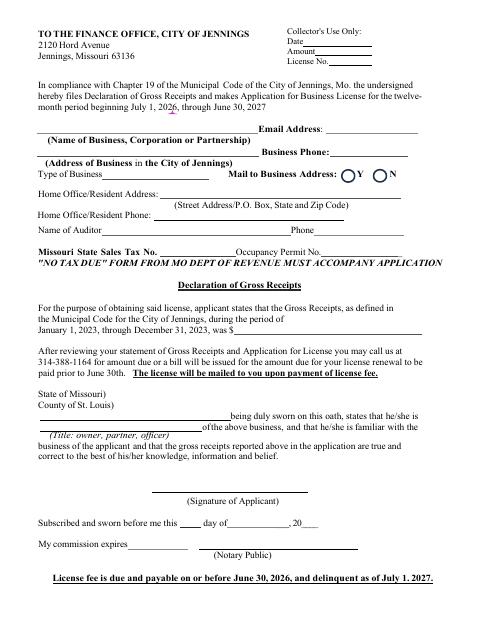
The application collects business contact details, business type, tax and occupancy permit numbers, and a declaration of gross receipts. Jennings directs applicants to submit it to the Finance Office and says a Missouri Department of Revenue “No Tax Due” form must accompany the application. The applicant swears that the reported receipts are true and correct; the license fee is due by June 30, 2026, and the license is mailed after payment.
Who needs it
A business applying for or renewing a Jennings license for the July 2026–June 2027 period must file this application and its gross receipts declaration.
Why it needs a notary
The form has a jurat; the applicant signs and swears that the gross receipts reported are true and correct before the notary.
How to get this notarized
- 1
Download the Application
Get the 2026–2027 Merchant Business License application from the City of Jennings.
- 2
Complete the Form
Enter the business information, license details, and gross receipts declaration; obtain the required “No Tax Due” form.
- 3
Book an Online Notary
Schedule a remote appointment with a commissioned online notary.
- 4
Sign on Video
Sign and swear to the gross receipts declaration during the online notarization session.
- 5
Submit to the City
Send the notarized application and accompanying “No Tax Due” form to the Jennings Finance Office.
Preview the form
The blank PDF straight from Jennings. Look it over, then upload your filled copy to start the notary session.

You’ll need ID and a webcam.
A licensed online notary will join you on video, verify your government-issued ID, witness your signature, and apply their seal. You’ll receive the notarized PDF by email when the session ends.
Frequently asked questions
- How do I get this Jennings business license application notarized?
- Complete the form, then book a commissioned online notary. Sign and swear to the gross receipts declaration during the video session, and submit the notarized application with the required “No Tax Due” form to the Jennings Finance Office.
- Do I need to sign the application in front of a notary?
- Yes. The form includes a jurat stating that the applicant subscribed and swore to the declaration before a notary. Wait to sign until your notary directs you during the appointment.
- Can I use an online notary for this form?
- Missouri authorizes its notaries to perform remote online notarizations under RSMo §486.1100 to §486.1205. A commissioned online notary can notarize your signature remotely; confirm with the city or town if unsure whether it accepts your notarized application.
- What must accompany my application?
- The form states that a “No Tax Due” form from the Missouri Department of Revenue must accompany the application. It also asks for business details, tax and occupancy permit numbers, and a sworn gross receipts declaration.