
Anaconda, MT · Deer Lodge County
Birth Certificate Request
Request a birth certificate from Anaconda-Deer Lodge County using this application. The form offers notarization as an identification alternative; it is not required for every applicant.
- licensed online notary
- ~15 min average
- Notarized PDF emailed
What you’ll need
- Government-issued photo ID
- Webcam-enabled device (laptop or phone)
- This form, ready to upload as a PDF
What this form is
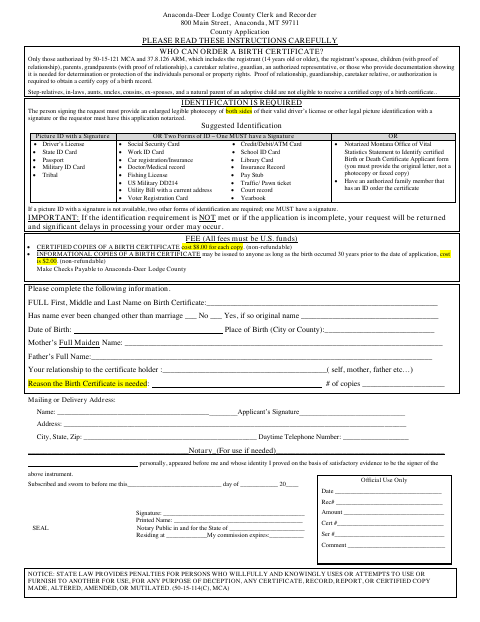
This Anaconda-Deer Lodge County application collects the birth record details, the applicant's relationship to the certificate holder, the reason for the request, and delivery information. Applicants must establish eligibility and identity under the instructions printed on the form. A notarial certificate is provided for applicants using the notarized application option instead of the listed identification documents. Confirm current fees, supporting documents, and acceptance of an electronically notarized application with the Clerk and Recorder before booking.
Who needs it
Eligible people requesting a birth record from Anaconda-Deer Lodge County who choose the notarized application option described in the county's identification instructions.
Why it needs a notary
Notarization is conditional: the application allows specified identification documents instead. Applicants choosing notarization sign before a notary, who completes the certificate at the bottom.
How to get this notarized
- 1
Download and review
Download the official PDF and read the instructions. Confirm that this form applies to your situation.
- 2
Confirm requirements
Check current submission requirements with the receiving office, including whether it accepts an electronically notarized document.
- 3
Complete your information
Fill in the applicable information and gather supporting documents. Leave notarial certificates for the notary.
- 4
Arrange notarization if needed
If your situation requires notarization, book a session with a commissioned online notary and follow the identity-verification instructions.
- 5
Sign and submit
Complete the notarial act during the session, then submit the finished document and required supporting materials to the receiving office.
Preview the form
The blank PDF straight from Anaconda. Look it over, then upload your filled copy to start the notary session.

You’ll need ID and a webcam.
A licensed online notary will join you on video, verify your government-issued ID, witness your signature, and apply their seal. You’ll receive the notarized PDF by email when the session ends.
Frequently asked questions
- How do I complete this form?
- Download the original PDF, follow its instructions, and complete the information that applies to you. Leave any signature requiring notarization unsigned until the session.
- Do I need a notary for this form?
- Not always. The form permits specified identification documents or a notarized application. Ask the Clerk and Recorder which option and submission format they will accept.
- Can I use an online notary?
- Confirm with the receiving office that it accepts an electronically notarized version for your situation before booking a session with a commissioned online notary.
- Where do I submit the completed form?
- Submit the completed request, required supporting documents, and current fee to the Anaconda-Deer Lodge County Clerk and Recorder as directed by that office.