
Columbia Falls, MT · Flathead County
General Business or Entity Registration Form 2026
This form records annual business or entity registration details for new and existing businesses, and allows businesses no longer operating to report their termination.
What this form is
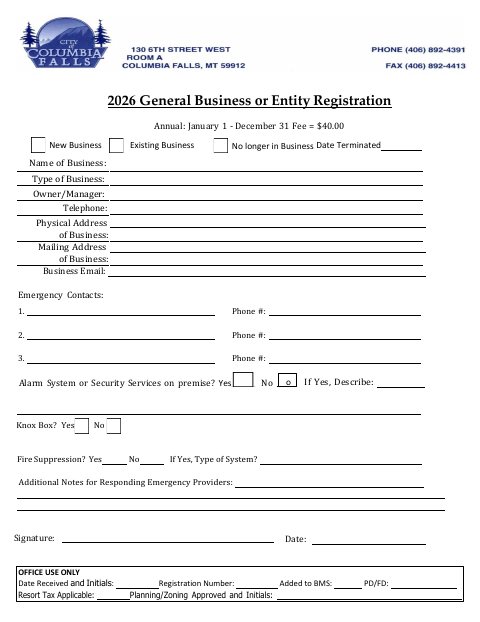
The General Business or Entity Registration Form records business details for the annual registration period, January 1 through December 31. It asks for the business name and type, owner or manager, contact and address information, emergency contacts, and details about alarm, security, and fire suppression systems. The form lists a $40 fee and includes a section for office use.
Who needs it
New and existing businesses can use this form to provide registration details, while businesses no longer operating can report their termination date.
How to submit it
Submit it to the city department named on the form; check the city website for current contact details.
About notarization
This form has no notary block; the signer signs and dates it, and no sworn or notarized attachment is described.
How to submit this form
- 1
Download The Form
Download the General Business or Entity Registration Form 2026.
- 2
Complete Business Details
Enter the business, owner or manager, address, contact, and emergency contact information requested.
- 3
Complete Safety Details
Answer the questions about security, alarm systems, fire suppression, and notes for emergency providers.
- 4
Sign And Submit
Sign and date the form, then submit it to the city department named on the form.
Frequently asked questions
- Who uses the General Business or Entity Registration Form?
- New and existing businesses can provide their registration information on the form. It also has an option for a business that is no longer operating to provide its termination date.
- What information does the form request?
- It asks for business and owner or manager details, contact information, emergency contacts, and information about alarm, security, and fire suppression systems. It also provides space for additional notes for emergency providers.
- Do I need a notary for the General Business or Entity Registration Form?
- No. This form has no notary block; the signer signs and dates it, and the form does not describe a sworn or notarized attachment.
- How do I submit the General Business or Entity Registration Form?
- Submit it to the city department named on the form; check the city website for current contact details. The form lists a $40 fee and includes an office-use section.
Need something notarized?
This General Business or Entity Registration Form 2026 doesn’t need a notary — but if you have another Columbia Falls form that does, a commissioned online notary can help.