
Helena, MT · Lewis and Clark County
Contact/Case Connection Form
This form helps Civic Access users request access to permit, development review, plan, or license records connected to their contact or company record.
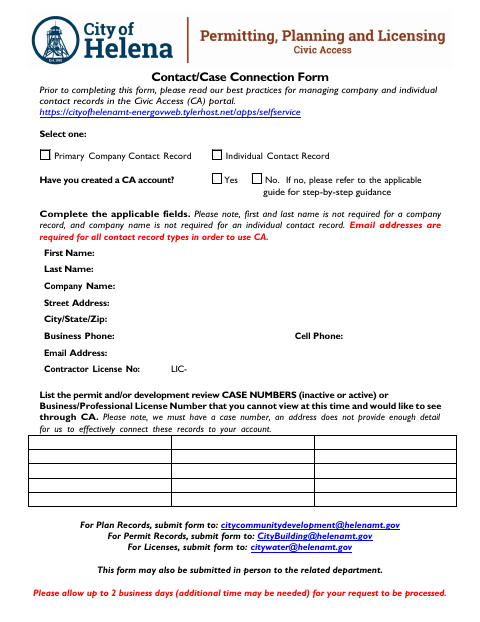
What this form is
Use this form to ask the city to connect a company or individual contact record in Civic Access with records the account cannot currently view. It asks for contact details, an email address, and the relevant case number or business or professional license number; the form notes that an address alone is not enough to connect records. Complete the applicable fields and select the record type.
Who needs it
Civic Access users who cannot view a permit, development review, plan, or license record and want it connected to their account need this form.
How to submit it
For plan records, email [email protected]; for permit records, email [email protected]; for licenses, email [email protected]. The form may also be submitted in person to the related department.
About notarization
No notary is required; the form mentions no notarized attachment or sworn step, so the signer just signs and dates it.
How to submit this form
- 1
Download The Form
Download the Contact/Case Connection Form.
- 2
Complete Applicable Fields
Select the contact record type and fill in the applicable fields. An email address is required for all contact record types.
- 3
Identify The Record
List the permit or development review case number, or the business or professional license number, for the record you cannot view.
- 4
Submit To The Related Department
Email the form to the address for the record type or submit it in person to the related department.
Frequently asked questions
- What does the Contact/Case Connection Form do?
- It lets Civic Access users ask the city to connect permit, development review, plan, or license records they cannot currently view to their account.
- What information does the form ask for?
- It asks for contact or company details, an email address, and the relevant permit or development review case number or business or professional license number. An address alone is not enough.
- Do I need a notary for the Contact/Case Connection Form?
- No. The form mentions no notarized attachment or sworn step; the signer just signs and dates it.
- How do I submit the Contact/Case Connection Form?
- Email it to the address listed for the record type: [email protected] for plans, [email protected] for permits, or [email protected] for licenses. You may also submit it in person to the related department.
Need something notarized?
This Contact/Case Connection Form doesn’t need a notary — but if you have another Helena form that does, a commissioned online notary can help.