
Ennis, MT · Madison County
Short-Term Rental Inspection Checklist
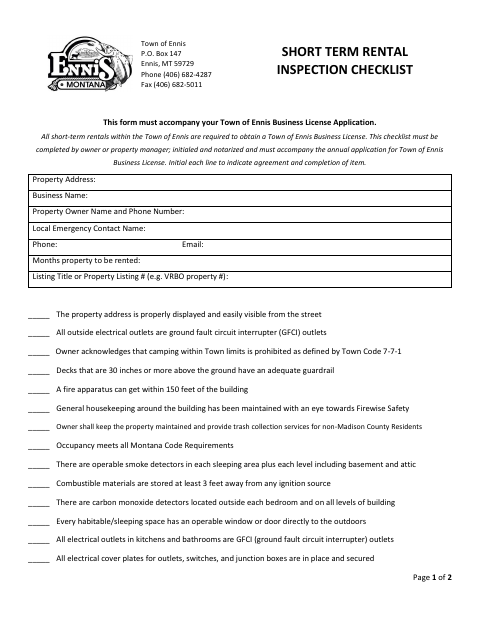
Ennis short-term rental owners or managers complete this notarized safety checklist with their annual business license application. It includes property details, inspection items, supporting-document requirements, and a signature certificate.
- licensed online notary
- ~15 min average
- Notarized PDF emailed
What you’ll need
- Government-issued photo ID
- Webcam-enabled device (laptop or phone)
- This form, ready to upload as a PDF
What this form is
The Town of Ennis short-term rental checklist records property and contact details and asks the owner or manager to initial safety and maintenance items. It also identifies licensing and inspection documents to include with the business license application. The final page explicitly requires notarization and provides a signature certificate. Complete the checklist accurately and confirm current town requirements and acceptance of an electronically notarized version before signing.
Who needs it
Owners or property managers submitting the required short-term rental inspection checklist with an Ennis annual business license application.
Why it needs a notary
The checklist explicitly requires notarization and instructs the signer not to sign without a notary. The final page has a notarial signature-witnessing certificate.
How to get this notarized
- 1
Download and review
Download the official PDF and read the instructions. Confirm that this form applies to your situation.
- 2
Confirm requirements
Check current submission requirements with the receiving office, including whether it accepts an electronically notarized document.
- 3
Complete your information
Fill in the applicable information and gather supporting documents. Leave notarial certificates for the notary.
- 4
Arrange notarization if needed
If your situation requires notarization, book a session with a commissioned online notary and follow the identity-verification instructions.
- 5
Sign and submit
Complete the notarial act during the session, then submit the finished document and required supporting materials to the receiving office.
Preview the form
The blank PDF straight from Ennis. Look it over, then upload your filled copy to start the notary session.

You’ll need ID and a webcam.
A licensed online notary will join you on video, verify your government-issued ID, witness your signature, and apply their seal. You’ll receive the notarized PDF by email when the session ends.
Frequently asked questions
- How do I complete this form?
- Download the original PDF, follow its instructions, and complete the information that applies to you. Leave any signature requiring notarization unsigned until the session.
- Do I need a notary for this form?
- Yes. The checklist explicitly says notarization is required and provides a certificate on page two. Confirm the accepted document format with the town.
- Can I use an online notary?
- Confirm with the receiving office that it accepts an electronically notarized version for your situation before booking a session with a commissioned online notary.
- Where do I submit the completed form?
- Submit the completed checklist and required supporting licenses and inspection documents with the Town of Ennis business license application.