
Northumberland, NH · Coos County
Disabled Exemption Application
This application lets a qualifying property owner apply to the Town of Northumberland for a disabled property tax exemption and submit required income, asset, and eligibility documentation.
- licensed online notary
- ~15 min average
- Notarized PDF emailed
What you’ll need
- Government-issued photo ID
- Webcam-enabled device (laptop or phone)
- This form, ready to upload as a PDF
What this form is
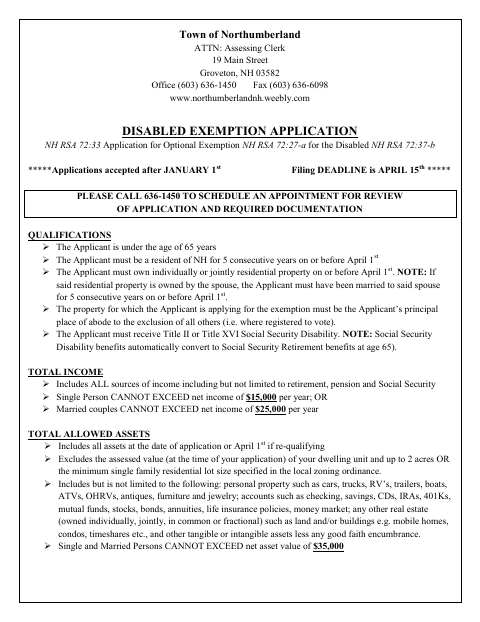
Property owners use this form to apply for Northumberland’s disabled exemption, which can reduce assessed property value if the applicant meets the form’s residency, age, disability, income, and asset qualifications. The application requests household, property, income, and asset details, supporting records, and signed certifications. The form says applications are accepted after January 1, the filing deadline is April 15, and applicants should call the assessing office to schedule a review appointment.
Who needs it
A Northumberland property owner seeking the disabled exemption should complete this application and provide the required supporting documents for the town’s review.
Why it needs a notary
The affidavit contains an acknowledgment before a notary public or Justice of the Peace; the applicant named in the acknowledgment signs before the notary.
How to get this notarized
- 1
Download the Application
Get the disabled exemption application and affidavit from the Town of Northumberland.
- 2
Complete the Form
Fill in the applicant, property, income, and asset information, and gather applicable supporting documents.
- 3
Book an Online Notary
Schedule a session with a commissioned online notary for the affidavit acknowledgment.
- 4
Sign on Video
Show identification and sign the affidavit when instructed during the online notarization session.
- 5
Submit to the Town
Contact the assessing office to arrange your application review and submit the completed form and required documents.
Preview the form
The blank PDF straight from Northumberland. Look it over, then upload your filled copy to start the notary session.

You’ll need ID and a webcam.
A licensed online notary will join you on video, verify your government-issued ID, witness your signature, and apply their seal. You’ll receive the notarized PDF by email when the session ends.
Frequently asked questions
- How do I submit the disabled exemption application?
- Complete the application, attach the supporting income and asset records listed in the form, and contact the assessing office to schedule a review appointment. The form gives an April 15 filing deadline.
- Do I need to sign the affidavit before a notary?
- Yes. The affidavit includes an acknowledgment before a notary public or Justice of the Peace. Sign the applicant signature line in front of the notary and complete the acknowledgment.
- Can I sign this form with an online notary?
- New Hampshire authorizes remote online notarization for its own notaries under RSA 456-B:6-a, effective February 6, 2022. RSA 456-B:4 also recognizes notarial acts performed by a notary public or other authorized officer of another state.
- What documents should I attach?
- The form lists records such as prior-year income tax returns, benefit statements, bank statements, and other financial documentation, when applicable. Check the application for the specific documents requested for your circumstances.