
Canaan, NH · Grafton County
Current Use Application
This application lets property owners request current use assessment for qualifying land and provide parcel details, land classifications, required documentation, and owner certifications.
- licensed online notary
- ~15 min average
- Notarized PDF emailed
What you’ll need
- Government-issued photo ID
- Webcam-enabled device (laptop or phone)
- This form, ready to upload as a PDF
What this form is
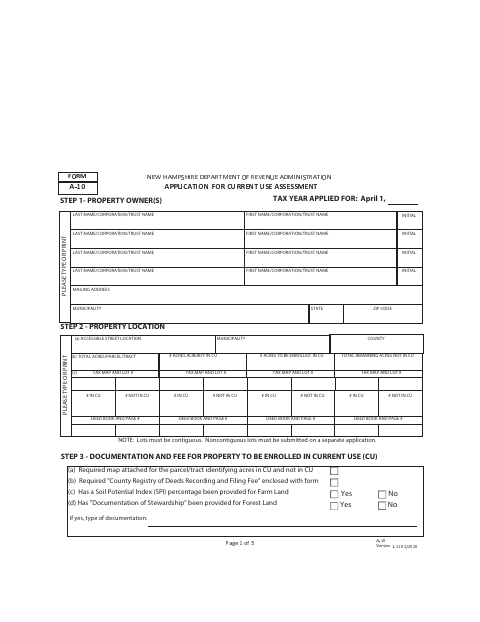
Use this form to apply to enroll land in current use assessment, identifying the property, acreage, land classifications, and supporting documentation. All owners of record or an agent with Power of Attorney must sign; the application also requests a map and filing fee. The municipal assessing officials review the application and record approval or denial. Check with the municipality about submission instructions and any current requirements.
Who needs it
Property owners seeking current use assessment for qualifying land must complete the application, provide the required supporting materials, and obtain signatures from all owners of record or an authorized agent.
Why it needs a notary
The form contains an owner certification and signature lines but no jurat or acknowledgment block is shown in the provided text; confirm notarization requirements with the town.
How to get this notarized
- 1
Download The Application
Get the Current Use Application from Canaan's municipal website.
- 2
Complete The Form
Enter owner, parcel, acreage, and land classification details, and gather the requested map and supporting documentation.
- 3
Book An Online Notary
If the town confirms notarization is needed, book a commissioned online notary and ask about signing requirements.
- 4
Sign On Video
If notarization is required, follow the notary's instructions and sign during the online video session.
- 5
Submit To The Town
Submit the completed application and required materials to the municipal assessing officials.
Preview the form
The blank PDF straight from Canaan. Look it over, then upload your filled copy to start the notary session.

You’ll need ID and a webcam.
A licensed online notary will join you on video, verify your government-issued ID, witness your signature, and apply their seal. You’ll receive the notarized PDF by email when the session ends.
Frequently asked questions
- How do I complete the Current Use Application?
- Enter owner and property details, acreage and land classifications, attach the required map and documentation, and arrange for all owners of record or an agent with Power of Attorney to sign.
- Do I need to sign this application before a notary?
- The provided form text shows owner certification and signature lines but no notarial certificate. Confirm with the town whether notarization is required before booking.
- Can I sign the form with an online notary?
- New Hampshire authorizes remote online notarization by its notaries, and recognizes notarial acts performed by a notary public or other authorized officer of another state. Ask the town whether it accepts this form notarized by a commissioned online notary.
- What supporting materials does the application request?
- The form requests a map showing acreage in and out of current use, the Registry of Deeds recording and filing fee, and specified farmland or forest land information when applicable.