
Hudson, NH · Hillsborough County
Sign Permit Application
The Town of Hudson sign permit application collects property, applicant, sign contractor, sign design, and location details for people seeking approval to erect a sign.
- licensed online notary
- ~15 min average
- Notarized PDF emailed
What you’ll need
- Government-issued photo ID
- Webcam-enabled device (laptop or phone)
- This form, ready to upload as a PDF
What this form is
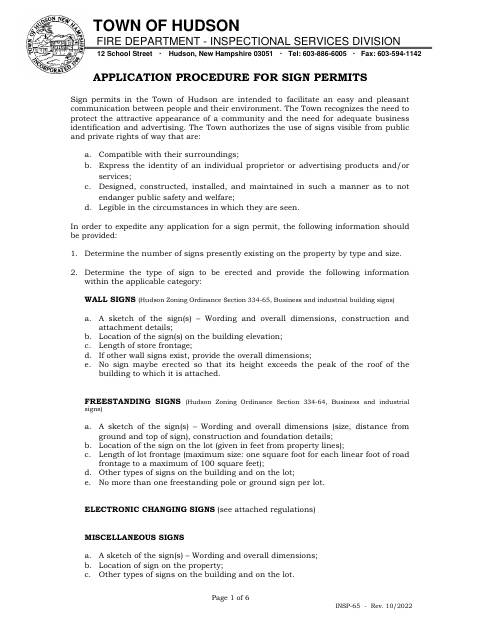
Use this six-page form to apply to Hudson’s Inspectional Services Division for a sign permit. It requests details about the property, sign type, dimensions, lighting, location, and existing signs, and calls for drawings or other supporting materials where applicable. For an electronic changing sign, the application includes an affidavit with zoning requirements and sworn signature blocks for the property owner, sign company, and applicant. The town notifies applicants whether applications are approved or denied.
Who needs it
Property owners, authorized representatives, applicants, and sign contractors seeking a Hudson sign permit should complete the relevant application sections and provide the requested attachments.
Why it needs a notary
The attached electronic changing sign affidavit has subscribed-and-sworn jurats; the property owner, sign company representative, and applicant each sign before a notary public.
How to get this notarized
- 1
Download the Form
Get the Sign Permit Application from the Town of Hudson and review the application procedure and any applicable sign requirements.
- 2
Complete the Application
Fill in the property, applicant, installer, sign, and location details, and gather the drawings or other materials requested for your sign.
- 3
Book an Online Notary
If applying for an electronic changing sign, arrange notarization for the affidavit’s property owner, sign company, and applicant signature blocks.
- 4
Sign on Video
Each affidavit signer signs before the commissioned online notary during the remote video session.
- 5
Submit to the Town
Submit the completed application and supporting materials to Hudson’s Inspectional Services Division and follow the town’s instructions.
Preview the form
The blank PDF straight from Hudson. Look it over, then upload your filled copy to start the notary session.

You’ll need ID and a webcam.
A licensed online notary will join you on video, verify your government-issued ID, witness your signature, and apply their seal. You’ll receive the notarized PDF by email when the session ends.
Frequently asked questions
- How do I get the electronic changing sign affidavit notarized?
- Complete the affidavit and arrange for each signer—the property owner, sign company representative, and applicant—to sign before a notary. Rush Notary offers online notarization by video.
- Do I need notarization for every sign permit application?
- The form’s subscribed-and-sworn notary blocks appear on the electronic changing sign affidavit. The application text does not show notary blocks for the general sign permit application.
- What should I include with the sign permit application?
- The form requests sign details and location information. Depending on the sign, it also calls for drawings, structural details, a photo, a plot plan, or manufacturer specifications.
- Can I sign this form with a commissioned online notary?
- New Hampshire authorizes remote online notarization by its notaries under RSA 456-B:6-a, and recognizes notarial acts performed by an authorized officer of another state under RSA 456-B:4. Confirm acceptance with the Town of Hudson if unsure.