
Acworth, NH · Sullivan County
Class V and VI Road Improvement Permit Application
This application is for anyone requesting permission from the Town of Acworth to perform work within the right of way on a Class V or Class VI road.
- licensed online notary
- ~15 min average
- Notarized PDF emailed
What you’ll need
- Government-issued photo ID
- Webcam-enabled device (laptop or phone)
- This form, ready to upload as a PDF
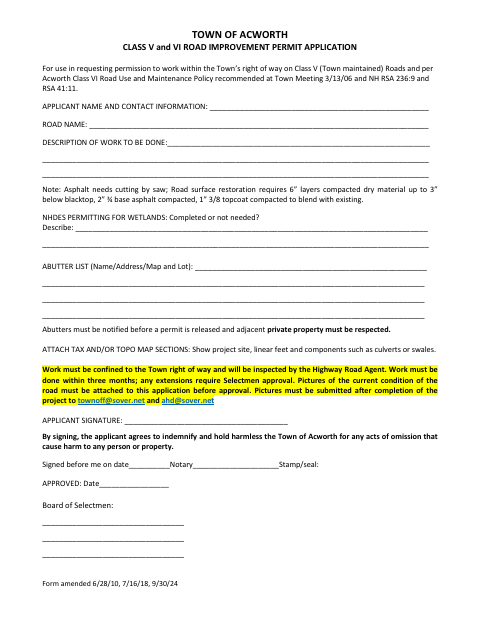
What this form is
Use this application to describe the proposed road work, identify the road and abutters, and provide information about wetlands permitting. The form asks applicants to attach tax or topographic map sections and photos of the road’s current condition; the town requires photos of the completed project as well. Work must stay within the town right of way, and the application must be approved before work begins.
Who needs it
Anyone seeking permission to perform improvement or other work within the Town of Acworth’s right of way on a Class V or Class VI road needs this application.
Why it needs a notary
The form has a “Signed before me” notary block; the applicant must sign the application before a notary and complete the date and stamp or seal fields.
How to get this notarized
- 1
Download the Application
Get the Class V and VI Road Improvement Permit Application from the Town of Acworth.
- 2
Complete the Form
Fill in applicant and road details, describe the work, provide abutter and wetlands information, and prepare requested map and photo attachments.
- 3
Book an Online Notary
Schedule a session with a commissioned online notary before signing the applicant section.
- 4
Sign on Video
Sign during the video session so the notary can complete the “Signed before me” block and stamp or seal fields.
- 5
Submit to the Town
Submit the notarized application and required attachments to the Town of Acworth for review and approval.
Preview the form
The blank PDF straight from Acworth. Look it over, then upload your filled copy to start the notary session.

You’ll need ID and a webcam.
A licensed online notary will join you on video, verify your government-issued ID, witness your signature, and apply their seal. You’ll receive the notarized PDF by email when the session ends.
Frequently asked questions
- How do I get the Acworth road improvement permit application notarized?
- Complete the application, then book an online notary. Sign the applicant section during the video session and have the notary complete the “Signed before me” date and stamp or seal fields.
- Do I need to attach maps and photos to this application?
- Yes. The form requests tax or topographic map sections showing the project site, linear feet, and components, plus photos of the road’s current condition. It also asks for photos after project completion.
- Can I use an online notary for this application?
- New Hampshire authorizes remote online notarization by its notaries under RSA 456-B:6-a. A commissioned online notary can notarize your signature by video; confirm the town will accept the completed application.
- What should I include when describing the road work?
- Identify the road and describe the proposed work. Include the requested abutter information, wetlands-permit status, and map attachments; confirm with the town/city if unsure about what to provide.