
Moorestown, NJ · Burlington County
Shared Barrier for Swimming Pools
This form records fence-owner and pool-owner statements when a neighbor’s fence serves as a swimming pool barrier, for submission to Moorestown’s Construction Department.
- licensed online notary
- ~15 min average
- Notarized PDF emailed
What you’ll need
- Government-issued photo ID
- Webcam-enabled device (laptop or phone)
- This form, ready to upload as a PDF
What this form is
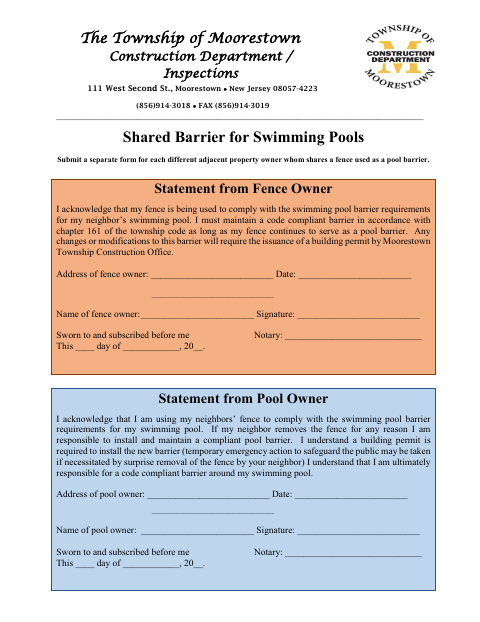
Moorestown’s Construction Department uses this form when a pool owner relies on a neighboring property owner’s fence to meet swimming pool barrier requirements. The fence owner acknowledges responsibility for maintaining a code-compliant barrier while it serves that purpose, and the pool owner accepts responsibility if the fence is removed. Submit a separate form for each different adjacent property owner whose fence is used as a pool barrier.
Who needs it
Pool owners using a neighbor’s fence as a swimming pool barrier and each adjacent fence owner whose fence serves that purpose need to complete the form.
Why it needs a notary
The form has a “Sworn to and subscribed before me” jurat for each statement; both the fence owner and pool owner sign before the notary.
How to get this notarized
- 1
Download The Form
Get the Shared Barrier for Swimming Pools form from Moorestown’s Construction Department.
- 2
Complete Both Statements
Fill in the fence-owner and pool-owner information and prepare a separate form for each different adjacent property owner.
- 3
Book An Online Notary
Schedule an appointment with a commissioned online notary for both signers.
- 4
Sign On Video
Each owner signs their statement before the notary during the online video session.
- 5
Submit To The Township
Send the completed form to the Moorestown Construction Department / Inspections.
Preview the form
The blank PDF straight from Moorestown. Look it over, then upload your filled copy to start the notary session.

You’ll need ID and a webcam.
A licensed online notary will join you on video, verify your government-issued ID, witness your signature, and apply their seal. You’ll receive the notarized PDF by email when the session ends.
Frequently asked questions
- How do I notarize the shared pool barrier form?
- Complete the fence-owner and pool-owner statements, then book an online notary appointment. Each signer must sign their statement before the notary during the video session.
- Do I need to submit a separate form for each neighbor?
- Yes. The form says to submit a separate form for each different adjacent property owner whose fence is used as a pool barrier.
- Can I sign this form with an online notary?
- New Jersey has permanently authorized remote online notarization and remote ink notarization for its own notaries since October 2021 (P.L. 2021, c.179; N.J.S.A. 52:7-10.9 et seq.). Use a commissioned online notary.
- Where do I submit the completed form?
- The form identifies the Township of Moorestown Construction Department / Inspections. Contact the department about how to submit the completed form; confirm with the municipality if unsure.