
Gloucester Township, MT · Camden County
Municipal Pool Rental Form
Gloucester Township groups and organizations use this form to request a municipal pool rental and provide event, contact, and attendance details.
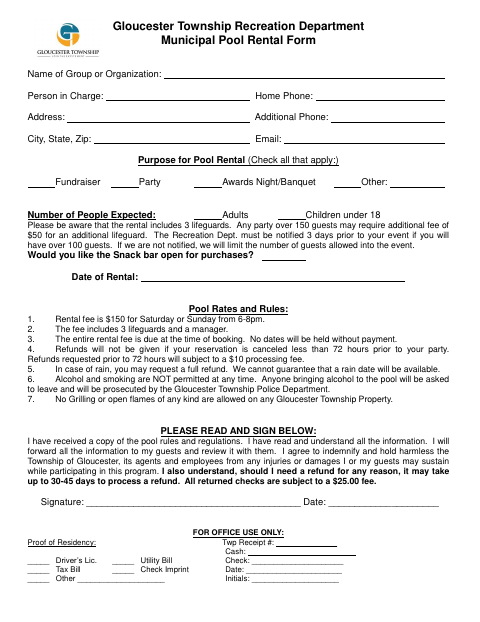
What this form is
The form requests information about the group or organization, person in charge, event purpose, expected attendance, snack bar preference, and rental date. It lists pool rental rates and rules, including payment at booking, guest notification requirements, and restrictions on alcohol, smoking, grilling, and open flames. The person in charge signs to acknowledge the rules and agree to the stated terms.
Who needs it
A group or organization seeking to rent a Gloucester Township municipal pool should complete this form with its event and contact details.
How to submit it
Submit it to the city department named on the form; check the city website for current contact details.
About notarization
This document is signed without a notary; the signer just signs and dates the form.
How to submit this form
- 1
Download The Form
Download the Municipal Pool Rental Form PDF.
- 2
Complete The Form
Provide the group, contact, event purpose, expected attendance, snack bar preference, and rental date.
- 3
Review The Rules
Read the pool rates and rules and share the information with your guests as stated on the form.
- 4
Sign And Submit
Sign and date the form, then submit it to the city department named on the form.
Frequently asked questions
- What information does the Municipal Pool Rental Form request?
- It asks for group and contact details, the rental purpose and date, expected attendance, and whether the snack bar should be open.
- What does the form say about pool rental payment?
- The form lists a $150 fee for Saturday or Sunday rentals from 6 to 8 p.m. and says the entire rental fee is due when booking.
- Do I need a notary for the Municipal Pool Rental Form?
- No. The form has a signature and date line but no notary block; the signer just signs and dates it.
- How do I submit the Municipal Pool Rental Form?
- The form does not provide submission contact details. Submit it to the city department named on the form and check the city website for current contact details.
Need something notarized?
This Municipal Pool Rental Form doesn’t need a notary — but if you have another Gloucester Township form that does, a commissioned online notary can help.