
Woodbridge Township, MT · Middlesex County
New Jersey Judiciary Records Request Form
This form lets people request court records by identifying themselves, the case, the records sought, and their preferred delivery method.
What this form is
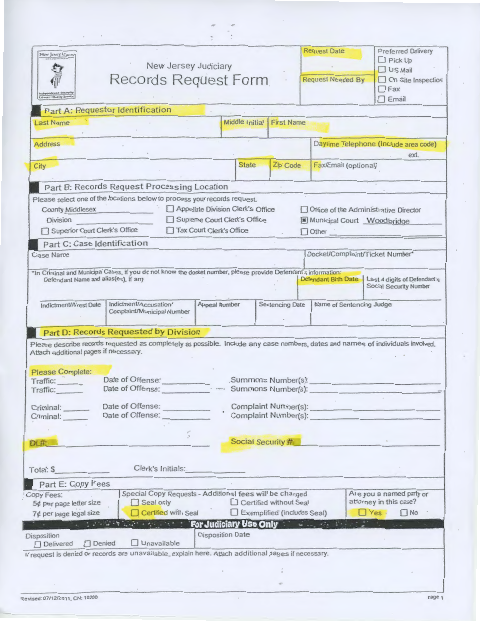
Use this form to request records from a selected New Jersey Judiciary processing location, including the Municipal Court Woodbridge Division. It asks for requester contact details, case information, a description of the records, and preferred delivery; it also lists copy options and per-page fees. The form includes fields for court staff to record processing results.
Who needs it
Anyone requesting court records through one of the processing locations listed on the form can use it to describe the records and identify the case.
How to submit it
Submit it to the city department named on the form; check the city website for current contact details.
About notarization
This request is signed and dated without a notary; the form lists no notarized or sworn attachment, so the requester just signs and dates it.
How to submit this form
- 1
Download The Form
Download the Judiciary Records Request Form.
- 2
Complete The Request
Enter your contact information, select a processing location and delivery preference, and identify the case and records requested.
- 3
Gather Any Additional Pages
Attach additional pages if needed to describe the records requested or explain a denied or unavailable request.
- 4
Submit The Form
Submit it to the city department named on the form; check the city website for current contact details.
Frequently asked questions
- What information does the Judiciary Records Request Form ask for?
- It asks for requester contact information, a processing location, case details, and a description of the records requested. It also includes preferred delivery options and copy selections.
- Do I need a notary for the Judiciary Records Request Form?
- No. This form is signed and dated without a notary and lists no notarized or sworn attachment; the requester just signs and dates it.
- How do I submit the Judiciary Records Request Form?
- The form lists processing locations and delivery preferences, but does not provide submission instructions or contact details. Submit it to the city department named on the form; check the city website for current contact details.
Need something notarized?
This New Jersey Judiciary Records Request Form doesn’t need a notary — but if you have another Woodbridge Township form that does, a commissioned online notary can help.