
Surf City, NJ · Ocean County
Rental Certificate and Liability Insurance Applications
This combined form lets Surf City rental property owners apply for a rental certificate and lets business owners and rental property owners register liability insurance with the Borough.
- licensed online notary
- ~15 min average
- Notarized PDF emailed
What you’ll need
- Government-issued photo ID
- Webcam-enabled device (laptop or phone)
- This form, ready to upload as a PDF
What this form is
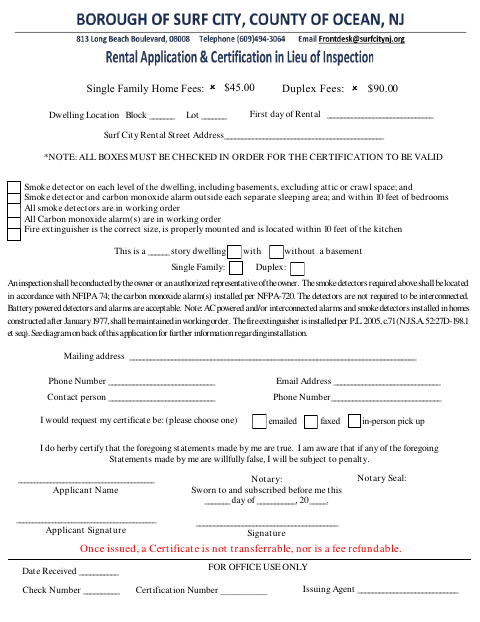
The rental application collects dwelling, contact, and safety information, including a certification that the statements are true; it also includes smoke detector, carbon monoxide alarm, and fire extinguisher checks. The accompanying liability insurance registration form is for businesses and rental units and requests insurance details and a certificate of insurance. The forms state that rental certificates are not transferable and fees are not refundable, and that liability insurance registration is annual.
Who needs it
Surf City rental property owners use the rental application, while business owners and rental property owners use the accompanying liability insurance registration form.
Why it needs a notary
The rental application carries a “Sworn to and subscribed before me” jurat; the applicant signs the certification before the notary, while no notary block appears on the insurance form.
How to get this notarized
- 1
Download the Forms
Download the combined rental certificate and liability insurance applications.
- 2
Fill In the Applicable Sections
Provide the required property, contact, safety, and insurance information, and check all required boxes.
- 3
Book an Online Notary
Arrange an online notarization for the rental application’s sworn certification.
- 4
Sign on Video
Sign the rental certification before the notary during your online video session.
- 5
Submit to the Borough
Submit the completed applicable forms and supporting insurance certificate to the Borough of Surf City.
Preview the form
The blank PDF straight from Surf City. Look it over, then upload your filled copy to start the notary session.

You’ll need ID and a webcam.
A licensed online notary will join you on video, verify your government-issued ID, witness your signature, and apply their seal. You’ll receive the notarized PDF by email when the session ends.
Frequently asked questions
- How do I complete the rental application?
- Fill in the dwelling and contact details, check every required safety box, and sign the truth certification before a commissioned online notary. Submit the completed application to the Borough.
- Do I need to notarize both applications?
- The rental application includes a sworn-and-subscribed jurat. The liability insurance registration form has a signature line but no notary block in the supplied form text.
- Can I sign the rental certification online?
- New Jersey has permanently authorized remote online notarization and remote ink notarization for its own notaries since October 2021 (P.L. 2021, c.179; N.J.S.A. 52:7-10.9 et seq.). Confirm the Borough’s submission requirements if unsure.
- What does the liability insurance form require?
- It asks applicable businesses and rental property owners to provide a certificate of insurance and select the stated minimum coverage limit. The form also lists an annual $5 registration fee.