
Pompton Lakes, NJ · Passaic County
Solicitors and Canvassers License Application
This application is for individuals and businesses seeking a Pompton Lakes solicitor or canvasser license, and collects applicant, employer, vehicle, background, and photograph information for Borough review.
- licensed online notary
- ~15 min average
- Notarized PDF emailed
What you’ll need
- Government-issued photo ID
- Webcam-enabled device (laptop or phone)
- This form, ready to upload as a PDF
What this form is
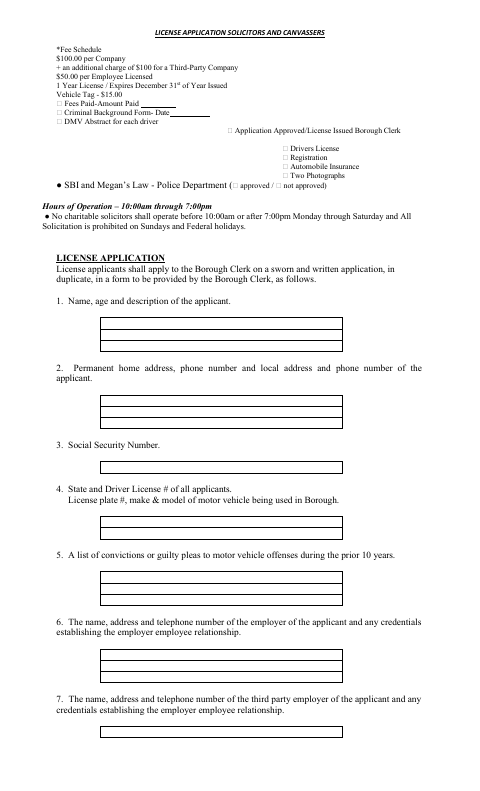
The application is submitted in duplicate to the Borough Clerk as a sworn written application by people seeking to solicit or canvass in Pompton Lakes. It requests personal and employer details, vehicle information, offense history, photographs, and information about prior canvassing, and includes the applicant’s agreement to follow the listed requirements. The form also lists fees, documents for review, operating hours, and rules for licensed solicitors and canvassers.
Who needs it
Individuals applying to solicit or canvass in Pompton Lakes, including applicants working for a company or third-party employer, must submit the application to the Borough Clerk.
Why it needs a notary
The form includes a field labeled “Notarized Signature”; the applicant signs that field before a notary, though the form does not show a separate jurat or acknowledgment block.
How to get this notarized
- 1
Download the Application
Get the Solicitors and Canvassers License Application from the Borough of Pompton Lakes.
- 2
Fill Out the Form
Complete the applicant, employer, vehicle, offense-history, and other requested information. Gather the photographs and listed supporting documents.
- 3
Book an Online Notary
Schedule a commissioned online notary for the application’s “Notarized Signature” field.
- 4
Sign on Video
Meet with the notary online and sign the application during the video session when instructed.
- 5
Submit to the Borough
Submit the sworn application in duplicate and required materials to the Borough Clerk, and follow the Borough’s instructions for fees and review.
Preview the form
The blank PDF straight from Pompton Lakes. Look it over, then upload your filled copy to start the notary session.

You’ll need ID and a webcam.
A licensed online notary will join you on video, verify your government-issued ID, witness your signature, and apply their seal. You’ll receive the notarized PDF by email when the session ends.
Frequently asked questions
- How do I get the solicitor application notarized?
- Complete the application, then book a commissioned online notary. Sign the form during the video session when directed, and submit the completed application and required materials to the Borough Clerk.
- Do I need to sign this application in front of a notary?
- The form includes a field labeled “Notarized Signature,” so plan to sign it before a notary. It does not provide a separate jurat or acknowledgment block; confirm with the municipality if unsure.
- Can I use online notarization for this form?
- New Jersey has permanently authorized remote online notarization and remote ink notarization for its own notaries since October 2021. A commissioned online notary can notarize remotely; check that the Borough will accept the notarized application.
- What else does the application request?
- The form requests applicant and employer information, vehicle details, offense history, two photographs, and supporting documents listed on the application, including driver’s license, vehicle registration, and insurance.