
Elmer, MT · Salem County
Zoning Verification
Property owners or authorized agents use this form to provide property details and describe a proposed tenant, business, or use.
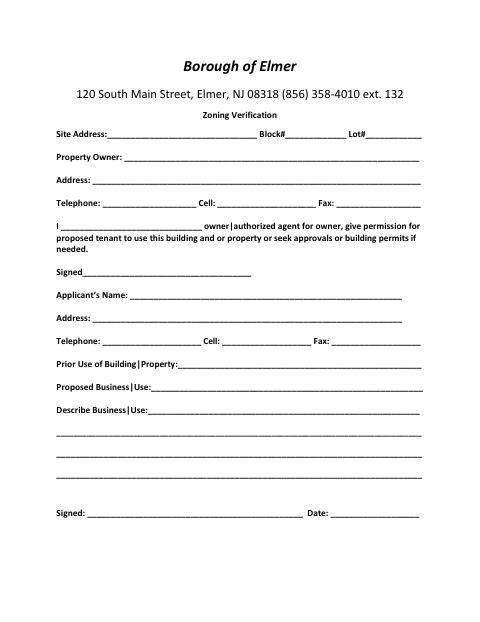
What this form is
The Zoning Verification form records the site address, block and lot numbers, owner information, and details about the property's prior and proposed use. An owner or authorized agent signs to give permission for a proposed tenant to use the building or property or seek approvals or building permits if needed. The form also asks for the applicant's contact details and a description of the proposed business or use.
Who needs it
A property owner or authorized agent can complete this form to provide information about a proposed tenant, business, or property use.
How to submit it
Submit it to the city department named on the form; check the city website for current contact details.
About notarization
This document is signed without a notary; the signer just signs and dates it.
How to submit this form
- 1
Download The Form
Download the Zoning Verification form.
- 2
Complete The Form
Enter the property and contact details, prior use, proposed business or use, and the requested description.
- 3
Sign And Date
The owner or authorized agent signs the permission statement, and the applicant signs and dates the form.
- 4
Submit To The City
Submit it to the city department named on the form; check the city website for current contact details.
Frequently asked questions
- Do I need a notary for the Zoning Verification form?
- No. This form is signed without a notary; the signer just signs and dates it.
- What information does the Zoning Verification form ask for?
- It asks for the site address, block and lot numbers, owner and applicant contact details, prior use, proposed business or use, and a description.
- Who can give permission on the form?
- The form provides for the property owner or an authorized agent for the owner to give permission for the proposed tenant to use the property or seek approvals or building permits if needed.
- How do I submit the Zoning Verification form?
- Submit it to the city department named on the form; check the city website for current contact details.