
Oxford Township, NJ · Warren County
Petition Endorsing Candidates for Municipal Office
This petition lets qualified voters endorse candidates for municipal office and is filed with the municipal clerk by a petition circulator seeking to place candidates on the primary ballot.
- licensed online notary
- ~15 min average
- Notarized PDF emailed
What you’ll need
- Government-issued photo ID
- Webcam-enabled device (laptop or phone)
- This form, ready to upload as a PDF
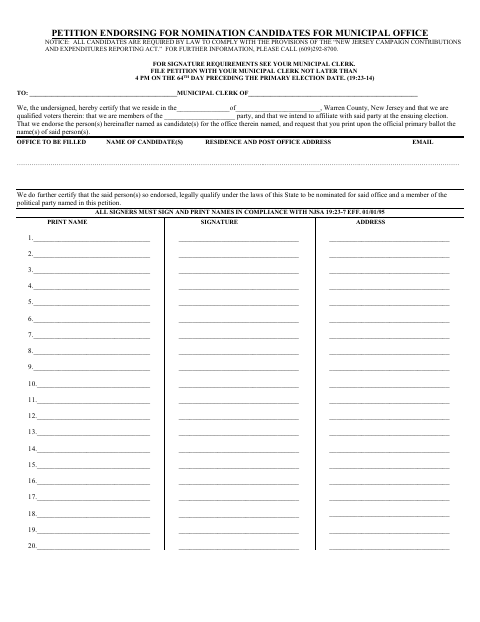
What this form is
The petition records voters’ endorsements, candidate information, and signatures, and includes a sworn statement from the person who circulated it. It also contains candidate acceptance, ballot designation, and oath-of-allegiance sections. The form instructs filers to submit it to the municipal clerk no later than 4 p.m. on the 64th day before the primary election; it says to check with the clerk for signature requirements.
Who needs it
A petition circulator and candidates seeking nomination for municipal office use this form to gather voter endorsements and provide the required candidate information and certifications.
How to get this notarized
- 1
- 2
Fill In the Form
Complete the candidate and office details and collect required voter information. Leave sworn signature sections unsigned until the notary session.
- 3
Book an Online Notary
Book a session with a commissioned online notary for the sections requiring an oath or sworn statement.
- 4
Sign on Video
Show identification and sign the applicable sworn sections during the online video appointment.
- 5
Submit to the Municipal Clerk
File the completed petition with the municipal clerk by the deadline shown on the form.
Preview the form
The blank PDF straight from Oxford Township. Look it over, then upload your filled copy to start the notary session.

You’ll need ID and a webcam.
A licensed online notary will join you on video, verify your government-issued ID, witness your signature, and apply their seal. You’ll receive the notarized PDF by email when the session ends.
Frequently asked questions
- How do I get the petition notarized online?
- Complete the form without signing the sworn sections, then book a session with a commissioned online notary. Sign the required sections during the video appointment.
- Do I need to notarize the entire petition?
- The form includes a sworn affidavit for the circulator and an oath of allegiance for the candidate, each with a notary, attorney, or officer-taking-oaths signature block.
- Can I use remote online notarization for this form?
- New Jersey has permanently authorized remote online notarization and remote ink notarization for its own notaries since October 2021 (P.L. 2021, c.179; N.J.S.A. 52:7-10.9 et seq.).
- When must I file the petition?
- The form says to file with the municipal clerk no later than 4 p.m. on the 64th day before the primary election. Check with the clerk about signature requirements.
- Where do I submit the completed form?
- File the petition with the municipal clerk, as directed on the form. If you are unsure about submission details or signing requirements, confirm with the municipality if unsure.