
Alden, NY · Erie County
Application for Public Access to Records
This form lets an applicant request access to or copies of records from the Town of Alden and certify that the information will not be used for solicitation or fundraising.
- licensed online notary
- ~15 min average
- Notarized PDF emailed
What you’ll need
- Government-issued photo ID
- Webcam-enabled device (laptop or phone)
- This form, ready to upload as a PDF
What this form is
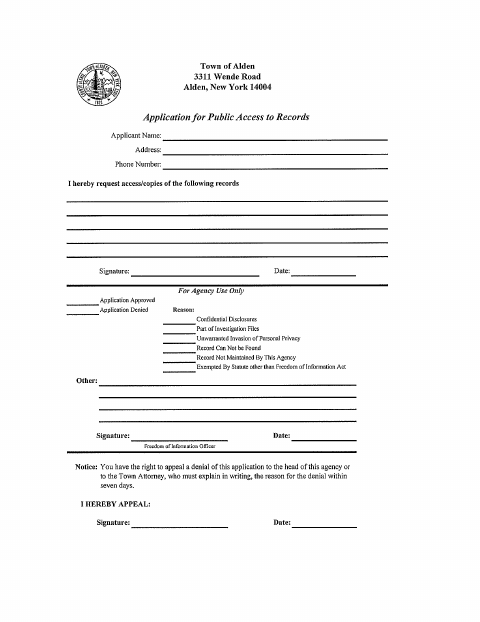
Use this two-page form to ask the Town of Alden for access to or copies of specified records. The applicant provides contact details, describes the requested records, and signs the application. The form also includes a certification that requested information will not be used or shared for solicitation or fundraising; that certification must be sworn before a notary. The town can use the application to record its decision, and the form includes a section for appealing a denial.
Who needs it
Anyone requesting access to or copies of records from the Town of Alden who must complete the form’s certification about solicitation and fundraising.
Why it needs a notary
The form carries a jurat marked “Sworn before me”; the applicant signs the certification of use of information before the notary.
How to get this notarized
- 1
Download the Form
Get the Town of Alden application for public access to records.
- 2
Fill Out the Request
Provide your contact information and describe the records you want to access or copy.
- 3
Book an Online Notary
Arrange a remote notarization for the certification of use of information.
- 4
Sign on Video
Sign the certification in front of the commissioned online notary during your video session.
- 5
Submit to the Town
Send the completed application to the Town of Alden using its stated submission process.
Preview the form
The blank PDF straight from Alden. Look it over, then upload your filled copy to start the notary session.

You’ll need ID and a webcam.
A licensed online notary will join you on video, verify your government-issued ID, witness your signature, and apply their seal. You’ll receive the notarized PDF by email when the session ends.
Frequently asked questions
- How do I complete the Town of Alden records application?
- Enter your contact information and identify the records you want to access or copy. Sign the use-of-information certification before a notary, then submit the completed form to the Town of Alden.
- Do I need to notarize the entire application?
- The form’s “Sworn before me” jurat appears beneath the certification of use of information. The applicant signs that certification before the notary; the form does not mark the records request or appeal signature for notarization.
- Can I use an online notary for this form?
- New York authorizes remote online notarization for its own notaries under Executive Law §135-c, effective in 2023. You can complete the sworn certification with a commissioned online notary by video.
- Where do I submit the completed form?
- The form names the Town of Alden and Town Clerk and provides the town’s address, phone number, and website. Confirm with the city, town or village if unsure about submission details.