
Buffalo, NY · Erie County
Mobile Peddler License Application
This application is for people seeking a Buffalo mobile peddler license and is filed with the city’s Office of Licenses with the listed supporting documents.
- licensed online notary
- ~15 min average
- Notarized PDF emailed
What you’ll need
- Government-issued photo ID
- Webcam-enabled device (laptop or phone)
- This form, ready to upload as a PDF
What this form is
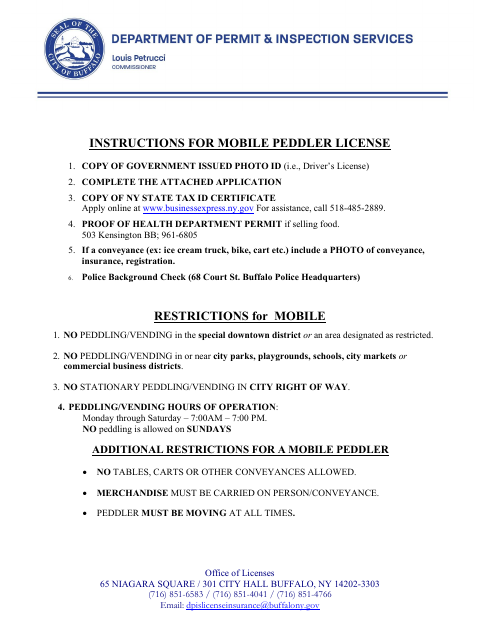
Buffalo’s Mobile Peddler License Application collects applicant, business, tax ID, merchandise, and conveyance details for a mobile peddler license. The city’s instructions list supporting items such as photo identification, a New York State tax ID certificate, and, when selling food, proof of a health department permit. Applicants should review the restrictions and instructions, complete the application, and provide the required supporting materials to the Office of Licenses.
Who needs it
Anyone applying to peddle or vend as a mobile peddler in Buffalo should complete this application and provide the supporting documents listed in the city’s instructions.
Why it needs a notary
The application carries a jurat stating it was subscribed and sworn before a Commissioner of Deeds or notary; the applicant signs before the notary.
How to get this notarized
- 1
Download the Application
Get the Mobile Peddler License Application and review the city’s instructions and restrictions.
- 2
Complete the Form
Enter your applicant and business details, tax ID, merchandise, and conveyance information; gather the supporting documents listed by the city.
- 3
Book an Online Notary
Schedule a remote session with a commissioned online notary for the application’s jurat.
- 4
Sign on Video
Join the video session and sign the application in front of the notary when instructed.
- 5
Submit to the City
Provide the notarized application and required supporting documents according to Buffalo’s current instructions.
Preview the form
The blank PDF straight from Buffalo. Look it over, then upload your filled copy to start the notary session.

You’ll need ID and a webcam.
A licensed online notary will join you on video, verify your government-issued ID, witness your signature, and apply their seal. You’ll receive the notarized PDF by email when the session ends.
Frequently asked questions
- How do I complete the notarized application online?
- Complete the application, then book a session with a commissioned online notary. Sign during the video session when instructed, and provide the notarized form and required supporting documents to the city.
- Do I need to provide documents with the application?
- The city’s instructions list a government-issued photo ID, a New York State tax ID certificate, and, if selling food, proof of a health department permit. Conveyance applicants should include a photo, insurance, and registration.
- Can I sign the application remotely?
- New York authorizes remote online notarization by its notaries under Executive Law §135-c, in effect since 2023. A commissioned online notary can guide you through the remote signing and notarization process.
- Where do I submit the completed application?
- The form lists Buffalo’s Office of Licenses at 65 Niagara Square / 301 City Hall. Follow the city’s current application instructions; confirm with the city, town or village if unsure.