
Lowville, NY · Lewis County
Marriage License Worksheet
This worksheet collects information from both applicants seeking a marriage license in the Town of Lowville.
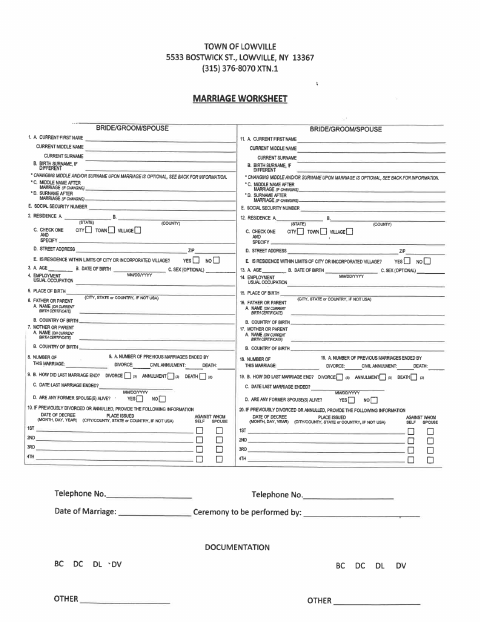
What this form is
The Town of Lowville marriage worksheet collects personal, residence, birth, parent, employment, and prior-marriage details for both applicants. It also asks about name choices after marriage and lists documentation options. The worksheet states that applicants’ Social Security numbers are mandatory and may be used for child support enforcement purposes.
Who needs it
Both people applying for a marriage license in the Town of Lowville need to provide the information requested on this worksheet.
How to submit it
Submit it to the city department named on the form; check the city website for current contact details.
About notarization
This worksheet is signed without a notary; it lists no notarized attachment or sworn step, so the signer just signs and dates it.
How to submit this form
- 1
Download The Worksheet
Download the Town of Lowville marriage license worksheet PDF.
- 2
Complete Applicant Details
Both applicants provide the information requested, including mandatory Social Security numbers.
- 3
Review The Information
Check the entries for both applicants, including any prior-marriage details and name choices.
- 4
Submit The Worksheet
Submit it to the city department named on the form; check the city website for current contact details.
Frequently asked questions
- What information does the Lowville marriage license worksheet request?
- It requests details for both applicants, including names, Social Security numbers, residences, birth information, parent information, employment, and prior marriages.
- Do I need a notary for the Lowville Marriage License Worksheet?
- No. This worksheet does not require notarization and lists no notarized attachment or sworn step; the signer just signs and dates it.
- How do I submit the Lowville marriage license worksheet?
- The worksheet does not give submission instructions. Submit it to the city department named on the form; check the city website for current contact details.
Need something notarized?
This Marriage License Worksheet doesn’t need a notary — but if you have another Lowville form that does, a commissioned online notary can help.