
Lima, NY · Livingston County
Contact Information and Notarized Request Form
This form provides contact details and a signed request for people seeking a Town of Lima service or record, with notarization required when the request is not made in person.
- licensed online notary
- ~15 min average
- Notarized PDF emailed
What you’ll need
- Government-issued photo ID
- Webcam-enabled device (laptop or phone)
- This form, ready to upload as a PDF
What this form is
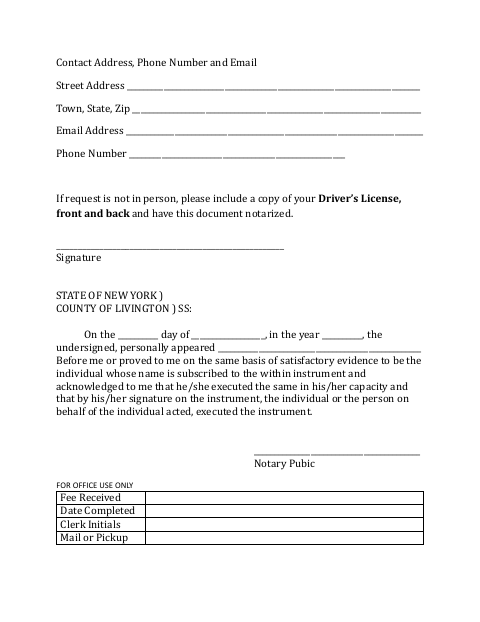
The form collects a street address, email address, phone number and signature. It states that people making a request other than in person must include a copy of the front and back of their driver’s license and have the document notarized. The form also includes a section for office use to record the fee, completion date, clerk initials and whether the item is mailed or picked up.
Who needs it
People making a request to the Town of Lima other than in person should complete this form, include both sides of their driver’s license and have it notarized.
Why it needs a notary
The form has an acknowledgment block, and the person whose name is on the form must appear before the notary and acknowledge signing it.
How to get this notarized
- 1
Download the Form
Get the Contact Information and Notarized Request Form from the Town of Lima.
- 2
Fill In Your Details
Enter your street address, town, state, ZIP code, email address and phone number.
- 3
Book an Online Notary
Arrange an online notarization for the form’s acknowledgment block.
- 4
Sign on Video
Follow the notary’s instructions to appear remotely and acknowledge your signature.
- 5
Submit the Request
Include copies of the front and back of your driver’s license and submit the notarized document to the Town of Lima.
Preview the form
The blank PDF straight from Lima. Look it over, then upload your filled copy to start the notary session.

You’ll need ID and a webcam.
A licensed online notary will join you on video, verify your government-issued ID, witness your signature, and apply their seal. You’ll receive the notarized PDF by email when the session ends.
Frequently asked questions
- How do I submit a request if I cannot go in person?
- Complete the form, include copies of the front and back of your driver’s license, and have the document notarized before sending it to the Town of Lima.
- Do I need to include my driver’s license?
- Yes. The form says that requests not made in person must include a copy of both the front and back of the driver’s license.
- Can I sign this form with a commissioned online notary?
- New York authorizes remote online notarization by its own notaries under Executive Law §135-c, in effect since 2023. Arrange to acknowledge your signature before a commissioned online notary.
- What should I do if I am unsure how to submit it?
- The form says the item may be mailed or picked up, but does not give submission instructions. Confirm with the city, town or village if unsure.