
Elbridge, NY · Onondaga County
Digital Message Sign Application
This application lets a person or group request a Village of Elbridge digital sign announcement for a community fundraising event.
What this form is
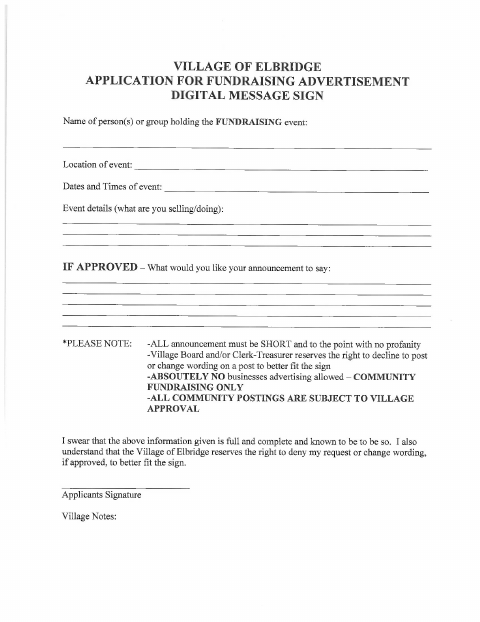
The application requests a digital message sign announcement for a community fundraising event. It asks for the organizer or group, event location, dates and times, event details, and proposed announcement wording if approved. The form says postings are subject to Village approval, prohibits business advertising, and allows the Village Board and/or Clerk-Treasurer to decline a post or change its wording.
Who needs it
A person or group seeking a Village of Elbridge digital sign announcement for a community fundraising event should complete this application.
How to submit it
Submit it to the city department named on the form; check the city website for current contact details.
About notarization
This application has a signature and sworn statement but no notary block; the signer signs it, and no notarized attachment or step is identified.
How to submit this form
- 1
Download the Application
Download the Digital Message Sign Application.
- 2
Complete the Event Details
Provide the organizer or group, event location, dates and times, event details, and proposed announcement wording.
- 3
Review and Sign
Keep the proposed announcement short and to the point, then sign the application.
- 4
Submit to the Village
Submit it to the city department named on the form; check the city website for current contact details.
Frequently asked questions
- What is the Digital Message Sign Application for?
- It requests a Village of Elbridge digital sign announcement for a community fundraising event and collects event details and proposed wording.
- Who may apply for a fundraising announcement?
- A person or group holding a community fundraising event can use the application. The form says business advertising is not allowed and postings require Village approval.
- Do I need a notary for the Digital Message Sign Application?
- No. The form has a signature and sworn statement but no notary block; the signer signs it, and no notarized attachment or step is identified.
- How do I submit the Digital Message Sign Application?
- Submit it to the city department named on the form; check the city website for current contact details.
Need something notarized?
This Digital Message Sign Application doesn’t need a notary — but if you have another Elbridge form that does, a commissioned online notary can help.