
Elbridge, NY · Onondaga County
Manufactured Mobile Home Building Permit Application
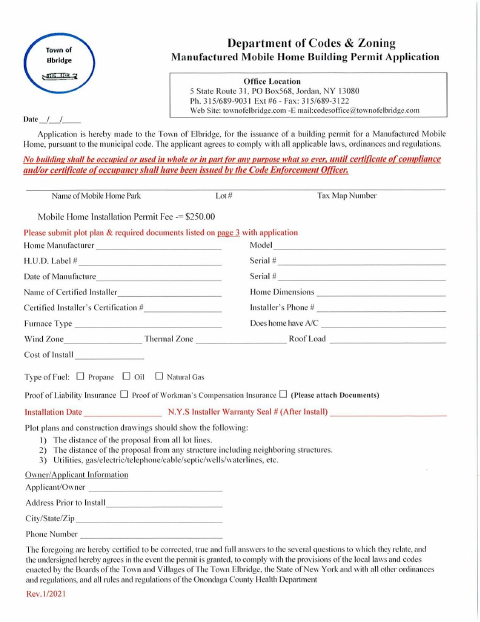
This application is for a manufactured or mobile home installation permit; the home’s owner or applicant submits it to the Town of Elbridge Department of Codes & Zoning.
- licensed online notary
- ~15 min average
- Notarized PDF emailed
What you’ll need
- Government-issued photo ID
- Webcam-enabled device (laptop or phone)
- This form, ready to upload as a PDF
What this form is
The application collects information about the home, lot, owner or applicant, and certified installer, and includes an affidavit about interests covered by the municipal application disclosure. The Town requests a plot plan and supporting documents, including installer credentials and insurance, with the application. It also describes required inspections during installation and before final approval; the form says the home may not be occupied until a certificate of compliance or occupancy is issued.
Who needs it
A home owner or applicant seeking a Town of Elbridge permit to install a manufactured or mobile home should complete and submit this application with the required supporting documents.
Why it needs a notary
The attached affidavit has a sworn jurat; the owner or applicant making the affidavit signs and swears or affirms its statements before a notary public.
How to get this notarized
- 1
Download The Application
Get the Manufactured Mobile Home Building Permit Application from the Town of Elbridge.
- 2
Fill In The Application
Provide the home, lot, owner or applicant, and installer details, and prepare the required affidavit and supporting documents.
- 3
Book An Online Notary
Schedule an online appointment for the person who will sign and swear or affirm the affidavit.
- 4
Sign On Video
Appear before the commissioned online notary and sign the affidavit as directed during the video session.
- 5
Submit To The Town
Send the notarized affidavit, completed application, and required documents to the Town of Elbridge Department of Codes & Zoning.
Preview the form
The blank PDF straight from Elbridge. Look it over, then upload your filled copy to start the notary session.

You’ll need ID and a webcam.
A licensed online notary will join you on video, verify your government-issued ID, witness your signature, and apply their seal. You’ll receive the notarized PDF by email when the session ends.
Frequently asked questions
- How do I get the affidavit notarized?
- Complete the affidavit, then book an online session with a commissioned online notary. Sign and swear or affirm the affidavit during the video appointment, following the notary’s instructions.
- Do I need to notarize the entire permit application?
- The form includes a sworn affidavit with a notary jurat. The affidavit signer must appear before a notary; check with the Town if you are unsure which application pages to submit.
- Can I sign this affidavit with an online notary?
- New York authorizes its notaries to perform remote online notarizations. Rush Notary can connect you with a commissioned online notary for the affidavit’s sworn jurat.
- What documents go with the application?
- The form requests a plot plan and supporting items such as proof of insurance, installer credentials, installation authorization, and home plans or specifications. Confirm with the city, town or village if unsure.