
Mexico, NY · Oswego County
FOIL Records Request Form and Noncommercial Use Affidavit
The Town of Mexico FOIL form lets people request records to inspect or receive by email or mail, with an affidavit for requests seeking a list of names.
- licensed online notary
- ~15 min average
- Notarized PDF emailed
What you’ll need
- Government-issued photo ID
- Webcam-enabled device (laptop or phone)
- This form, ready to upload as a PDF
What this form is
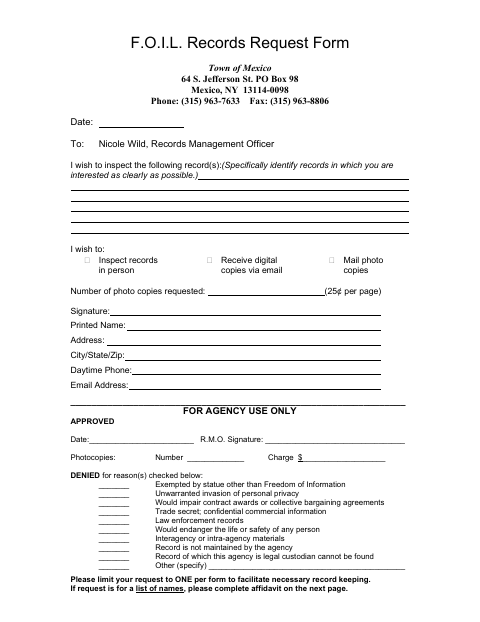
Use this form to identify the Town of Mexico records you want and choose whether to inspect them in person, receive digital copies by email, or request photocopies by mail. The form says to complete the affidavit on page two if your request is for a list of names; the affidavit certifies that the requested documents will not be used for commercial purposes. The town uses the first page to process and document the request.
Who needs it
Anyone requesting Town of Mexico records can use this form; people requesting a list of names must also complete the noncommercial-use affidavit on page two.
How to get this notarized
- 1
Download The Form
Get the Town of Mexico FOIL Records Request Form and review both pages.
- 2
Fill In The Request
Describe the records clearly, choose how you want to access them, and add your contact information. Complete the affidavit if requesting a list of names.
- 3
Book An Online Notary
If completing the affidavit, arrange a session with a commissioned online notary.
- 4
Sign On Video
Sign the affidavit during the online notary session and complete the notarial process.
- 5
Submit To The Town
Send the completed request and, when applicable, notarized affidavit to the Town of Mexico using submission instructions confirmed with the town.
Preview the form
The blank PDF straight from Mexico. Look it over, then upload your filled copy to start the notary session.

You’ll need ID and a webcam.
A licensed online notary will join you on video, verify your government-issued ID, witness your signature, and apply their seal. You’ll receive the notarized PDF by email when the session ends.
Frequently asked questions
- How do I complete the Town of Mexico FOIL request?
- Identify the records, select how you want to access them, and provide your contact details. If requesting a list of names, complete the page-two affidavit and sign it before a notary.
- Do I need to notarize the FOIL request form?
- The first-page records request has no notary block. The second-page affidavit for a request for a list of names must be signed before a notary.
- Can I sign the affidavit with an online notary?
- New York authorizes remote online notarization by a commissioned online notary under Executive Law §135-c. Confirm with the city, town or village if unsure whether it will accept a remotely notarized affidavit.
- How do I submit the completed form?
- The form lists the Town of Mexico Records Management Officer at 64 S. Jefferson St., PO Box 98, Mexico, NY 13114-0098, and provides a fax number. Contact the town for submission guidance.