
Ontario, NY · Wayne County
Planned Unit Development Application
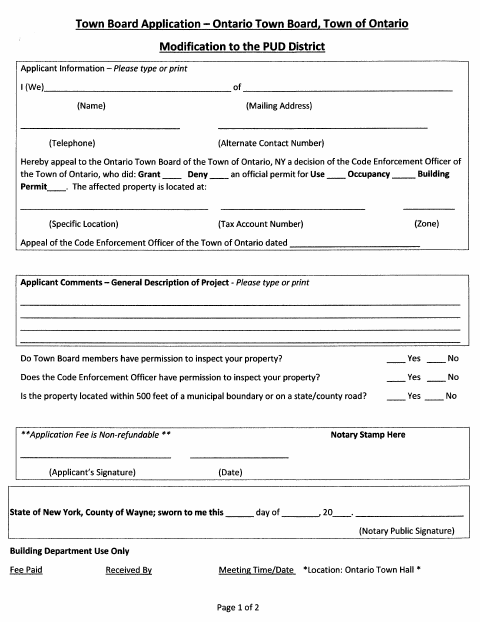
This two-page application is for applicants appealing a Code Enforcement Officer decision to the Ontario Town Board about a permit affecting property in the Town of Ontario.
- licensed online notary
- ~15 min average
- Notarized PDF emailed
What you’ll need
- Government-issued photo ID
- Webcam-enabled device (laptop or phone)
- This form, ready to upload as a PDF
What this form is
The form is headed “Modification to the PUD District” and asks for applicant and property details, information about the decision being appealed, project comments, and inspection permissions. It also asks applicants to respond to five statements about area variances, with an additional sheet allowed if needed. The form includes a non-refundable application fee and a sworn signature section; contact the Town to confirm which application details and supporting materials apply to your matter.
Who needs it
Applicants appealing a Code Enforcement Officer decision about a permit for use, occupancy, or a building on property in the Town of Ontario should use this form.
Why it needs a notary
The form has a sworn-to jurat for the applicant; sign the applicant signature line before a commissioned online notary completes the jurat.
How to get this notarized
- 1
Download the Application
Get the Planned Unit Development application from the Town of Ontario.
- 2
Fill Out the Form
Enter applicant and property details, describe the project, answer applicable questions, and prepare any additional sheet needed.
- 3
Book an Online Notary
Arrange a remote session with a commissioned online notary to complete the sworn signature.
- 4
Sign on Video
Sign the applicant line during the online notary session so the notary can complete the jurat.
- 5
Submit to the Town
Follow the Town of Ontario's instructions to submit the completed application and pay the applicable fee.
Preview the form
The blank PDF straight from Ontario. Look it over, then upload your filled copy to start the notary session.

You’ll need ID and a webcam.
A licensed online notary will join you on video, verify your government-issued ID, witness your signature, and apply their seal. You’ll receive the notarized PDF by email when the session ends.
Frequently asked questions
- How do I complete the sworn signature?
- Fill out the application, then sign the applicant signature line during a video session with a commissioned online notary. The notary completes the sworn-to section.
- Do I need to answer the area variance statements?
- The second page asks applicants to respond to five statements about area variances and permits an additional sheet if necessary. Confirm with the Town which responses apply to your application.
- Can I use online notarization for this form?
- New York authorizes its own notaries to perform remote online notarizations under Executive Law §135-c. Ask the Town whether it accepts this notarized form in your circumstances.
- Where do I submit the completed application?
- The form identifies the Ontario Town Board and lists the Building Department for office use. Confirm submission instructions, fees, and any required supporting materials with the Town; confirm with the city, town or village if unsure.
Planned Unit Development Application in other New York cities
Each city publishes its own version of this form. Pick the city where you’re filing.