
Elmsford, NY · Westchester County
Proxy Statement
The Proxy Statement lets a property owner authorize someone else to make a building, electrical, plumbing, mechanical, sign, or architectural review application in the Village of Elmsford.
- licensed online notary
- ~15 min average
- Notarized PDF emailed
What you’ll need
- Government-issued photo ID
- Webcam-enabled device (laptop or phone)
- This form, ready to upload as a PDF
What this form is
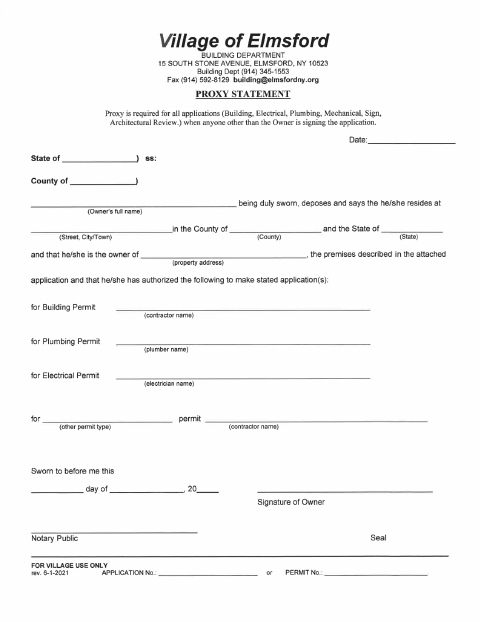
The Village of Elmsford requires this statement for building, electrical, plumbing, mechanical, sign, and architectural review applications when someone other than the owner signs the application. The owner identifies the property and the person authorized to make the application, then swears to the statement before a notary. The form is for the Village Building Department and includes spaces for application or permit numbers for village use.
Who needs it
A property owner needs this form when authorizing someone else, such as a contractor, to make one of the listed applications for the owner’s property.
Why it needs a notary
The form contains a sworn-to-before-me jurat, so the property owner must sign and swear to the statement in the notary’s presence.
How to get this notarized
- 1
Download the Proxy Statement
Get the Proxy Statement from the Village of Elmsford website.
- 2
Fill In the Form
Enter the owner, property, authorized person, and applicable permit information.
- 3
Book an Online Notary
Arrange an online notarization for the owner who must swear to the statement.
- 4
Sign on Video
The owner signs and swears to the statement while appearing before the notary online.
- 5
Submit to the Village
Submit the notarized proxy with the applicable application to the Village of Elmsford.
Preview the form
The blank PDF straight from Elmsford. Look it over, then upload your filled copy to start the notary session.

You’ll need ID and a webcam.
A licensed online notary will join you on video, verify your government-issued ID, witness your signature, and apply their seal. You’ll receive the notarized PDF by email when the session ends.
Frequently asked questions
- How do I complete the Elmsford Proxy Statement?
- The owner fills in the property and authorized applicant information, signs and swears to the statement before a notary, then submits it with the applicable application.
- Do I need to notarize the Proxy Statement?
- Yes. The form includes a sworn-to-before-me section and a space for a notary public, so the owner must swear to and sign the statement before a notary.
- Can I sign this form with a commissioned online notary?
- New York authorizes its notaries to perform remote online notarizations under Executive Law §135-c, in effect since 2023. Confirm the Village’s submission requirements if you plan to use an online notarization.
- Who should I contact if I am unsure whether this proxy applies?
- The form says a proxy is required when someone other than the owner signs the listed applications. Contact the Village Building Department, and confirm with the city, town or village if unsure.