
Pittsboro, NC · Chatham County
Easement and Right-of-Way Plat Application
This application guides property owners, applicants, developers, and surveyors through submitting an easement or right-of-way plat for Town of Pittsboro review and eventual recording in Chatham County.
- licensed online notary
- ~15 min average
- Notarized PDF emailed
What you’ll need
- Government-issued photo ID
- Webcam-enabled device (laptop or phone)
- This form, ready to upload as a PDF
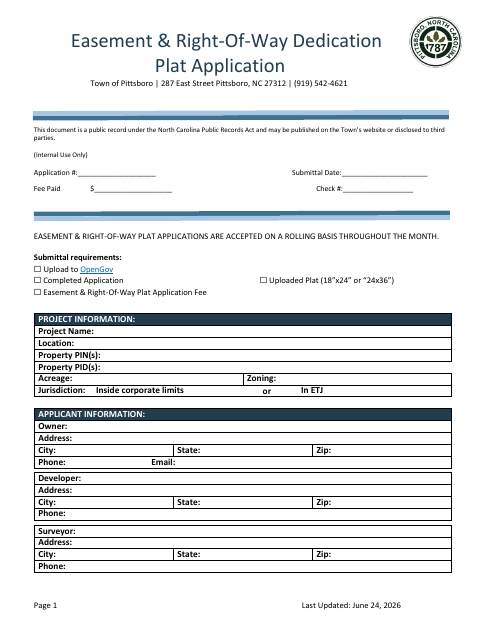
What this form is
The application collects project, property, owner, developer, and surveyor information and lists the plat materials and review steps required by the Town of Pittsboro. Applicants upload the application and plat through OpenGov; after review and revisions, the form describes hard-copy Mylar and electronic-signature paths, with the approved plat recorded at the Chatham County Register of Deeds. For the hard-copy process, the owner’s signature on the plat must be notarized.
Who needs it
Property owners and their applicants, developers, or surveyors use this application to submit an easement or right-of-way plat for Town review and recording.
Why it needs a notary
The hard-copy Mylar process includes a Notary Public Certification acknowledging execution under oath; the owner signs the plat before the notary.
How to get this notarized
- 1
Download the Application
Get the Easement and Right-of-Way Plat Application and review its submittal requirements and process options.
- 2
Complete the Application
Provide project, property, owner, developer, and surveyor information, and prepare the plat and required materials.
- 3
Check Notarization Eligibility
The hard-copy Mylar process requires a notarized owner signature. Confirm which signing option is available before booking.
- 4
Book a Commissioned Online Notary
If eligible, arrange a session with a commissioned online notary and follow the notary’s instructions.
- 5
Sign on Video
Sign during the video session only if the selected notarization method is permitted for your situation.
- 6
Submit to the Town
Upload the application and plat through OpenGov, respond to review comments, and follow the approved plat process.
Preview the form
The blank PDF straight from Pittsboro. Look it over, then upload your filled copy to start the notary session.

You’ll need ID and a webcam.
A licensed online notary will join you on video, verify your government-issued ID, witness your signature, and apply their seal. You’ll receive the notarized PDF by email when the session ends.
Frequently asked questions
- How do I submit the easement and right-of-way plat application?
- Upload the completed application, plat, and application fee through OpenGov. After Town review and any revisions, follow the applicable hard-copy Mylar or electronic-signature process described in the form.
- Do I need to notarize the owner’s signature?
- The hard-copy Mylar process requires the owner’s notarized signature on the plat. The form also provides a Notary Public Certification acknowledging execution under oath.
- Can I use remote online notarization for this form in North Carolina?
- North Carolina’s remote electronic notarization program has not launched. Emergency video notarization is different and requires both the signer and notary to be inside North Carolina; check signing options before booking a commissioned online notary.
- What should I confirm before recording the approved plat?
- The form directs applicants to record the signed final plat at the Chatham County Register of Deeds. Confirm witness and recording requirements with the Register of Deeds or a title professional, and confirm with the city or town if unsure.