
Durham, NC · Durham County
Change of Contractor Application
This application lets an applicant change the contractor listed on an existing Durham permit without changing the permitted work scope.
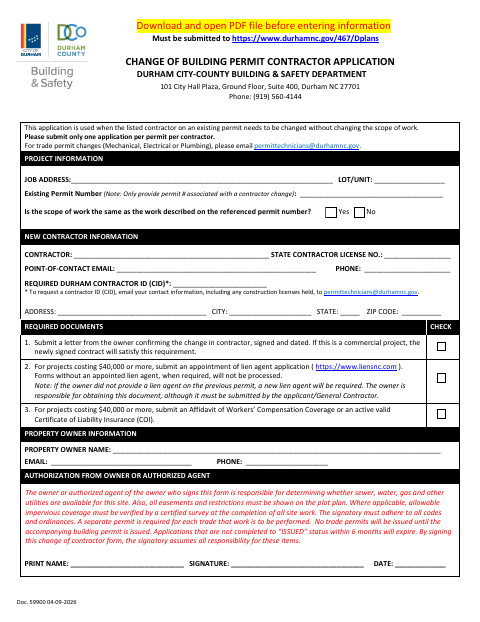
What this form is
Use this application when the contractor listed on an existing permit needs to change and the scope of work remains the same. It requests project and permit details, information about the new contractor and property owner, and the owner’s or authorized agent’s signature. The application also lists required supporting documents, including an owner’s letter and, for qualifying projects, lien-agent and insurance or workers’ compensation documents.
Who needs it
Applicants changing the contractor on an existing permit without changing its work scope should complete this application and provide the required supporting documents.
How to submit it
Submit the application through Dplans at https://www.durhamnc.gov/467/Dplans. For mechanical, electrical, or plumbing trade permit changes, email [email protected].
About notarization
This application is signed and dated without a notary; the owner’s change letter must also be signed and dated, and no notarized or sworn attachment is identified.
How to submit this form
- 1
Download The Application
Download and open the PDF before entering information.
- 2
Complete The Application
Enter the project and permit details, new contractor and property owner information, and the required authorization signature and date.
- 3
Gather Supporting Documents
Include the owner’s signed and dated change letter, or a newly signed commercial contract. Add the required lien-agent and insurance or workers’ compensation documents when applicable.
- 4
Submit Through Dplans
Submit the application through https://www.durhamnc.gov/467/Dplans. Email [email protected] for trade permit changes.
Frequently asked questions
- Do I need a notary for the Change of Contractor Application?
- No. The application calls for a signature and date, not notarization. The owner’s change letter must also be signed and dated; the document does not identify a notarized or sworn attachment.
- How do I submit the Change of Contractor Application?
- Submit it through Dplans at https://www.durhamnc.gov/467/Dplans. For mechanical, electrical, or plumbing trade permit changes, the form directs applicants to email [email protected].
- When can I use this application?
- Use it to change the contractor listed on an existing permit when the scope of work remains the same. The form says to submit only one application per permit per contractor.
- What supporting documents may be required?
- Include an owner’s signed and dated change letter, or a newly signed contract for a commercial project. For projects costing $40,000 or more, the form also requires lien-agent documentation and workers’ compensation coverage or an active liability insurance certificate.
Need something notarized?
This Change of Contractor Application doesn’t need a notary — but if you have another Durham form that does, a commissioned online notary can help.