
Winston-Salem, NC · Forsyth County
Secondary/Accessory Kitchen Affidavit
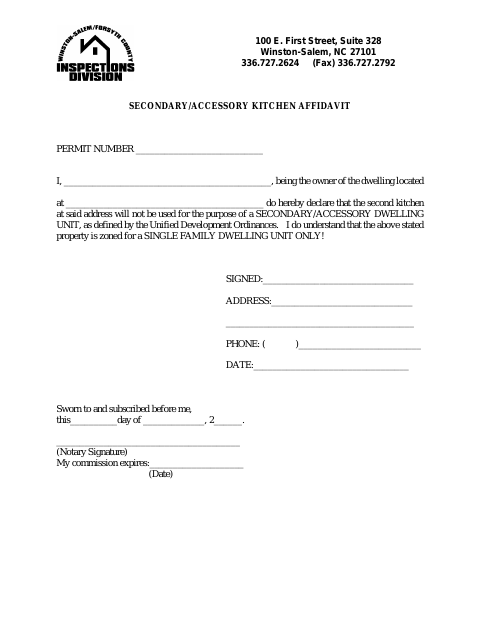
This affidavit records a dwelling owner’s sworn statement that a second kitchen will not be used as a secondary/accessory dwelling unit, for submission with the related city permit.
- licensed online notary
- ~15 min average
- Notarized PDF emailed
What you’ll need
- Government-issued photo ID
- Webcam-enabled device (laptop or phone)
- This form, ready to upload as a PDF
What this form is
The affidavit identifies the permit number and property, then records the owner’s declaration that the second kitchen will not serve as a secondary/accessory dwelling unit under the Unified Development Ordinances. It also states the owner understands the property is zoned for a single-family dwelling unit only. Use it when the City requests this affidavit for a permit; complete the owner and property details and sign before a notary.
Who needs it
A dwelling owner whose property has a second kitchen needs this affidavit when the City requests a sworn statement about its intended use for a permit.
How to get this notarized
- 1
Download The Affidavit
Get the Secondary/Accessory Kitchen Affidavit from the City of Winston-Salem.
- 2
Fill In The Form
Enter the permit number, dwelling address, owner details, phone number, and date. Review the declaration before signing.
- 3
Book An Online Notary
Arrange an appointment with a commissioned online notary and confirm the City will accept your planned notarization.
- 4
- 5
Submit To The City
Submit the completed affidavit with the related permit materials as directed by the City.
Preview the form
The blank PDF straight from Winston-Salem. Look it over, then upload your filled copy to start the notary session.

You’ll need ID and a webcam.
A licensed online notary will join you on video, verify your government-issued ID, witness your signature, and apply their seal. You’ll receive the notarized PDF by email when the session ends.
Frequently asked questions
- How do I complete the Secondary/Accessory Kitchen Affidavit?
- Enter the permit number, property address, owner details, phone number, and date. The owner makes the stated declaration and signs before a notary, who completes the jurat.
- Do I need to sign this affidavit in front of a notary?
- Yes. The form includes a sworn-to-and-subscribed-before-me jurat, so the owner should sign in the notary’s presence and have the notary complete the signature and commission-expiration fields.
- Can I use an online notary for this affidavit?
- North Carolina’s remote electronic notarization program has not launched. Emergency video notarization is a separate process requiring both signer and notary to be in North Carolina; ask the City whether it accepts your planned notarization.
- What if I am unsure whether the City requires this affidavit?
- The form includes a permit number but does not state when the City requires it. Contact the City about your permit and intended use of the second kitchen; confirm with the city if unsure.
Other forms in Winston-Salem
Accessory Structure Affidavit
Winston-Salem
Change of Contractor Affidavit
Winston-Salem
Electrical Installation by Property Owner Affidavit
Winston-Salem
Affidavit of On-Site Wastewater Existing System
Winston-Salem
Installation By Property Owner (Mechanical) Affidavit
Winston-Salem
Non-Conforming Use Affidavit
Winston-Salem