
Angier, NC · Harnett County
Email/Phone Notification Form
Angier residents use this form to sign up for selected town email or phone notifications and choose their preferred language.
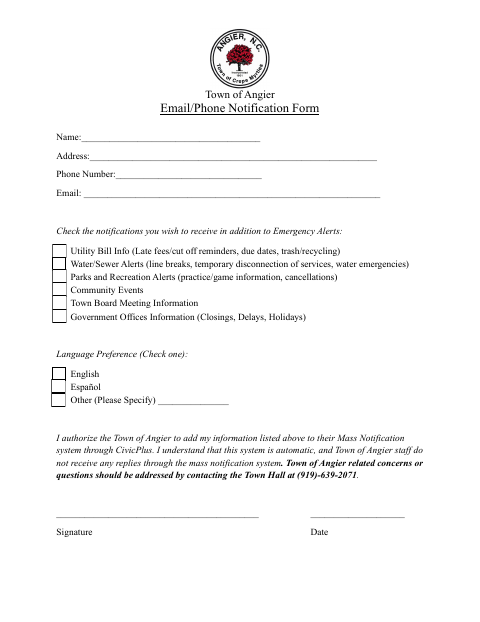
What this form is
The form lets residents add their contact information to the Town of Angier’s mass notification system through CivicPlus and select which non-emergency alerts they want to receive. It asks for a name, address, phone number, email, notification choices, and language preference, followed by a signature and date. It also explains that replies to system messages are not received by town staff.
Who needs it
Angier residents who want to receive selected town notifications by email or phone should complete and sign this form.
How to submit it
Submit it to the city department named on the form; check the city website for current contact details.
About notarization
This form is signed and dated without a notary; it lists no notarized attachment or related sworn step.
How to submit this form
- 1
Download The Form
Download the Email/Phone Notification Form.
- 2
Complete Your Information
Enter your name, address, phone number, and email, then select notifications and a language preference.
- 3
Sign And Date
Sign and date the form. The document does not list any attachments.
- 4
Submit To The City
Submit it to the city department named on the form; check the city website for current contact details.
Frequently asked questions
- What does the Email/Phone Notification Form do?
- It lets residents provide contact information, select town notifications beyond emergency alerts, and choose a language preference for the Town of Angier’s mass notification system.
- Who should complete this form?
- Angier residents who want to receive selected town alerts by email or phone can fill in their contact details, choose notifications and a language, then sign and date the form.
- Do I need a notary for the Email/Phone Notification Form?
- No. The form has a signature and date line but no notary block; it lists no notarized attachment or related sworn step.
- How do I submit the Email/Phone Notification Form?
- The form does not specify a submission method. Submit it to the city department named on the form; check the city website for current contact details.
Need something notarized?
This Email/Phone Notification Form doesn’t need a notary — but if you have another Angier form that does, a commissioned online notary can help.