
Clayton, NC · Johnston County
Precious Metals Dealer Permit Application
This application collects business, applicant, ownership, and background information for a person or business applying for a regular or special occasion precious metals dealer permit.
- licensed online notary
- ~15 min average
- Notarized PDF emailed
What you’ll need
- Government-issued photo ID
- Webcam-enabled device (laptop or phone)
- This form, ready to upload as a PDF
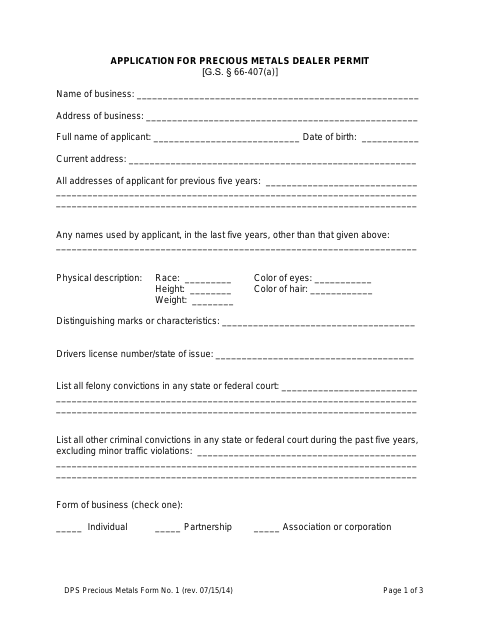
What this form is
The form asks for the applicant’s identifying details, addresses, criminal convictions, business type, and information about owners and employees when applicable. It also records the applicant’s proposed bond or trust arrangement and includes fields for law-enforcement processing. The applicant signs the application under oath, and the form includes a notary block; it also lists photograph, fingerprint, and supplemental-information items.
Who needs it
An individual or business applying for a regular or special occasion precious metals dealer permit completes this application, including applicable ownership and supplemental information.
Why it needs a notary
The application has a jurat stating it was sworn to and subscribed before a notary; the applicant signs the application before the notary.
How to get this notarized
- 1
Download The Application
Get the Precious Metals Dealer Permit Application and review all three pages before entering information.
- 2
Fill In Applicant And Business Details
Complete the applicable identification, address, business, ownership, employee, background, and bond or trust sections.
- 3
Arrange Supporting Items
Include applicable supplemental information and follow the form’s directions about a photograph or ID and fingerprints.
- 4
Book An Online Notary
Arrange a notary for the application’s sworn jurat, and confirm the receiving agency accepts the notarization method.
- 5
Sign On Video Before The Notary
Sign the application in the notary’s presence and complete the sworn-to-and-subscribed portion.
- 6
Submit To The Law Enforcement Agency
Submit the completed application and required supporting items to the appropriate law enforcement agency.
Preview the form
The blank PDF straight from Clayton. Look it over, then upload your filled copy to start the notary session.

You’ll need ID and a webcam.
A licensed online notary will join you on video, verify your government-issued ID, witness your signature, and apply their seal. You’ll receive the notarized PDF by email when the session ends.
Frequently asked questions
- How do I complete the precious metals dealer permit application?
- Fill in the applicant and business details, attach applicable supplemental information, and complete the form’s photograph, fingerprint, and bond or trust sections. Sign the sworn application before a notary, then submit it to the law enforcement agency.
- Do I need to sign the application in front of a notary?
- Yes. The form says the application is sworn to and subscribed before a notary, so the applicant should wait to sign until appearing before the notary.
- Can I use an online notary for this application in North Carolina?
- North Carolina’s remote electronic notarization program has not launched. Emergency video notarization is a separate process requiring both signer and notary to be in North Carolina. A commissioned online notary may offer another option; confirm acceptance with the law enforcement agency.
- What supporting items does the application mention?
- The form refers to a recent photograph or ID, fingerprints, and—when applicable—a supplementary information sheet for each listed co-owner. It also asks the applicant to indicate a bond or trust arrangement.
- Where do I submit the completed permit application?
- The form includes fields for the law enforcement agency receiving and processing the application. Confirm the correct submission location and any additional requirements with the agency; confirm with the city or town if unsure.