
Rocky Mount, NC · Nash County
Notice of Appeal to the Board of Adjustment
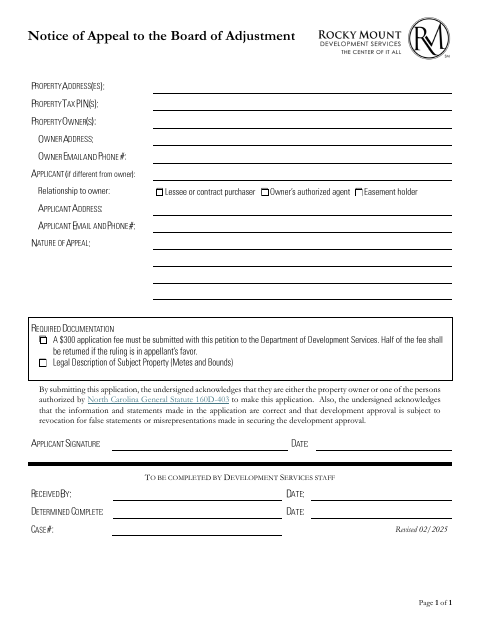
This form authorizes a named person to submit an appeal application and represent a property owner before the Rocky Mount Board of Adjustment.
- licensed online notary
- ~15 min average
- Notarized PDF emailed
What you’ll need
- Government-issued photo ID
- Webcam-enabled device (laptop or phone)
- This form, ready to upload as a PDF
What this form is
The property owner uses this form to authorize someone to submit an appeal application and act on the owner's behalf in matters connected with a variance or appeal to the Board of Adjustment. The authorization covers submitting supplemental materials, appearing at quasi-judicial hearings, giving testimony, making commitments, and agreeing to approval conditions. The form accompanies an appeal application to the City of Rocky Mount.
Who needs it
A property owner who wants another person to submit an appeal application or represent them in proceedings before the Rocky Mount Board of Adjustment needs this authorization.
Why it needs a notary
The form has an acknowledgment stating the signer appeared before the notary and acknowledged signing; the property owner granting authorization signs before the notary.
How to get this notarized
- 1
Download The Form
Get the Notice of Appeal to the Board of Adjustment and review its owner authorization and notary acknowledgment.
- 2
Fill In The Authorization
Enter the owner's name, property location, authorized person's name, and any other requested information.
- 3
Book A Notary
Arrange notarization and confirm with the city if unsure whether your chosen notarization method is accepted.
- 4
Sign Before The Notary
The property owner signs and acknowledges the signature before the notary. For video signing, confirm availability and acceptance first.
- 5
Submit To The City
Include the completed authorization with the appeal application submitted to the City of Rocky Mount.
Preview the form
The blank PDF straight from Rocky Mount. Look it over, then upload your filled copy to start the notary session.

You’ll need ID and a webcam.
A licensed online notary will join you on video, verify your government-issued ID, witness your signature, and apply their seal. You’ll receive the notarized PDF by email when the session ends.
Frequently asked questions
- Who signs the authorization?
- The property owner who grants another person authority signs the form and acknowledges that signature before a notary.
- What authority does the owner give the agent?
- The form authorizes the named person to submit materials, appear at hearings, give testimony, make commitments, and agree to conditions related to the application.
- Do I need to notarize the property owner's signature?
- Yes. The form includes an acknowledgment for the owner's signature, stating that the signer appeared before the notary and acknowledged signing.
- How do I arrange notarization if I want to sign online?
- North Carolina's remote electronic notarization program has not launched. Emergency video notarization is separate and requires both signer and notary to be in North Carolina. Confirm with the city if unsure whether a commissioned online notary's notarization will be accepted.