
Winterville, NC · Pitt County
Homeowner Exemption Affidavit
This affidavit lets a property owner or an authorized firm or corporation representative claim an exemption from contractor licensure for building construction or alteration and submit the sworn statement to the Town of Winterville.
- licensed online notary
- ~15 min average
- Notarized PDF emailed
What you’ll need
- Government-issued photo ID
- Webcam-enabled device (laptop or phone)
- This form, ready to upload as a PDF
What this form is
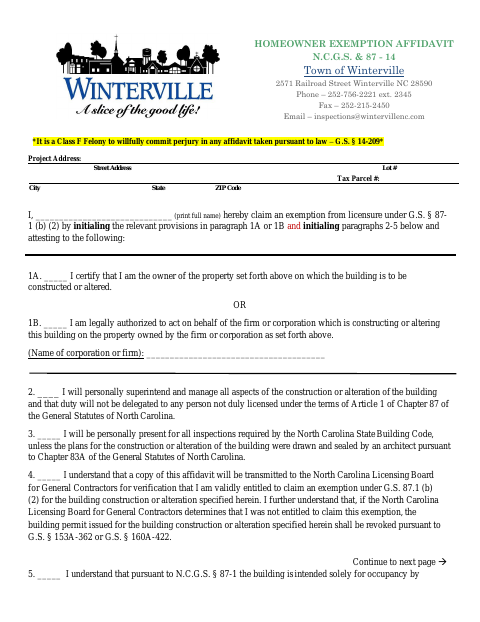
The signer chooses whether they are the property owner or are authorized to act for a firm or corporation, then attests to personally managing the project and meeting the form’s occupancy conditions. The form explains that a copy may be sent to the North Carolina Licensing Board for General Contractors to verify exemption eligibility, and that a building permit may be revoked if the exemption is not valid. Submit it with the relevant building permit materials when claiming the exemption.
Who needs it
A property owner, or an authorized representative of a firm or corporation, may need this affidavit when claiming the form’s contractor-licensure exemption for construction or alteration.
How to get this notarized
- 1
Download The Affidavit
Get the Homeowner Exemption Affidavit from the Town of Winterville.
- 2
Complete The Form
Enter the project and signer information, select the applicable owner or representative statement, and complete the required attestations.
- 3
Book An Online Notary
Arrange a notarial appointment and check with Winterville about whether it accepts online notarization for this form.
- 4
Sign Before The Notary
Sign when instructed so the notary can complete the sworn-or-affirmed jurat.
- 5
Submit To The Town
Submit the notarized affidavit with the relevant building permit materials according to Winterville’s instructions.
Preview the form
The blank PDF straight from Winterville. Look it over, then upload your filled copy to start the notary session.

You’ll need ID and a webcam.
A licensed online notary will join you on video, verify your government-issued ID, witness your signature, and apply their seal. You’ll receive the notarized PDF by email when the session ends.
Frequently asked questions
- How do I notarize the Homeowner Exemption Affidavit?
- Complete the applicable statements, then sign the affidavit during the notarial act. The form includes a sworn-or-affirmed and subscribed-before-me jurat. Check with Winterville about its submission and acceptance requirements.
- Do I need to sign in front of a notary?
- Yes. The form has a notary jurat and states that the affidavit is sworn to or affirmed and subscribed before a notary. Wait to sign until the notary instructs you.
- Can I use a commissioned online notary for this form?
- North Carolina has enacted a remote electronic notarization law for its notaries, but that program has not launched. Emergency video notarization requires the signer and notary to be in North Carolina and is not remote online notarization. Ask Winterville whether it accepts a notarization performed by a commissioned online notary.
- What does this affidavit certify?
- It records the signer’s claim to a contractor-licensure exemption and their attestations about managing the project, inspections, and occupancy. The form says the licensing board may verify eligibility and the permit may be revoked if the exemption is invalid.
- Where do I submit the completed affidavit?
- The form is from the Town of Winterville Inspections Department and concerns a building permit exemption. Follow the town’s submission instructions; confirm with the city or town if unsure.
Homeowner Exemption Affidavit in other North Carolina cities
Each city publishes its own version of this form. Pick the city where you’re filing.