
Tryon, NC · Polk County
Fire Alarm Registration Application
Tryon residents, businesses, and government offices use this application to register a fire alarm or submit a re-registration to the Fire Department.
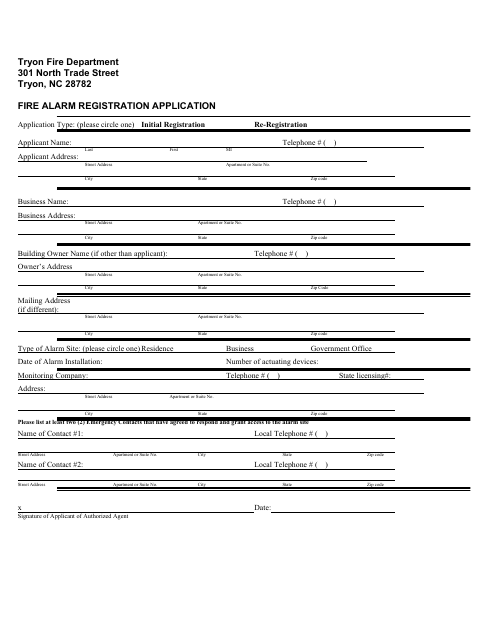
What this form is
The Tryon Fire Department uses this application to register a fire alarm initially or record a re-registration. Applicants provide contact and site details, alarm installation and device information, monitoring company information, and at least two emergency contacts who agree to respond and grant access to the alarm site. The applicant or authorized agent signs and dates it.
Who needs it
Residents, businesses, and government offices registering or re-registering an alarm at a site in Tryon need this application.
How to submit it
Submit it to the city department named on the form; check the city website for current contact details.
About notarization
This application is signed and dated without notarization; it identifies no sworn attachment, though other documents may use a commissioned online notary.
How to submit this form
- 1
Download The Application
Download the Fire Alarm Registration Application PDF.
- 2
Complete The Application
Choose initial registration or re-registration and provide the requested applicant, site, alarm, monitoring company, and contact information.
- 3
Gather Contact Details
List at least two emergency contacts who have agreed to respond and grant access to the alarm site.
- 4
Sign And Submit
Have the applicant or authorized agent sign and date the application, then submit it to the city department named on the form.
Frequently asked questions
- Do I need a notary for the Fire Alarm Registration Application?
- No. The application calls for the applicant or authorized agent to sign and date it, and identifies no sworn attachment. Other documents may use a commissioned online notary.
- How do I submit the Fire Alarm Registration Application?
- Submit it to the city department named on the form; check the city website for current contact details.
- What information does the application request?
- It requests applicant, business and owner contact details, alarm site and installation information, monitoring company details, and at least two emergency contacts.