
West Fargo, ND · Cass County
Liquor License Renewal Application Form C
This seven-page Form C renews a West Fargo liquor license and is completed by the applicant, with required business, ownership, manager, and server information and notarized signatures.
- licensed online notary
- ~15 min average
- Notarized PDF emailed
What you’ll need
- Government-issued photo ID
- Webcam-enabled device (laptop or phone)
- This form, ready to upload as a PDF
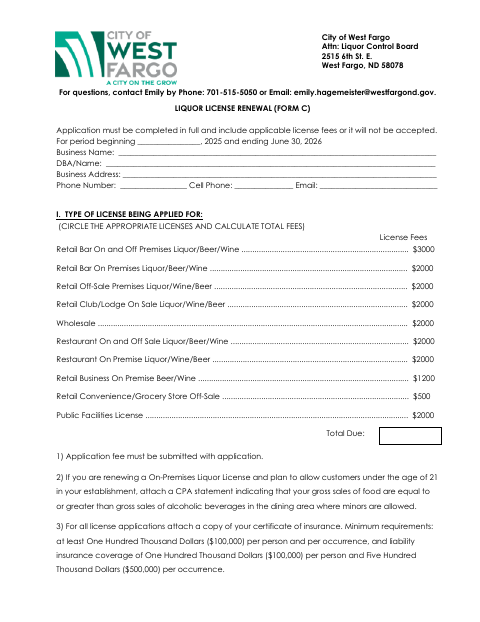
What this form is
West Fargo’s Liquor License Renewal Form C collects information about the applicant, business, ownership, resident manager, and employees involved in serving alcohol. The applicant must complete the form in full and include applicable license fees; the form also calls for a certificate of insurance and other attachments that may apply, such as a revised floor plan. It is addressed to the city’s Liquor Control Board for a renewal application.
Who needs it
Applicants seeking to renew a West Fargo liquor license should complete Form C and provide the required fees, insurance certificate, and applicable supporting materials.
Why it needs a notary
The form includes a state-jurat block stating the applicant’s listed names were subscribed and sworn before a notary; all listed owner signatures must be notarized.
How to get this notarized
- 1
Download Form C
Get the West Fargo Liquor License Renewal Form C and review the application and renewal checklist.
- 2
Complete the Application
Fill in the applicant, license, business, manager, and server details, answer the validation questions, and gather required fees and attachments.
- 3
Book an Online Notary
Arrange a session with a commissioned online notary for the owner signatures requiring notarization.
- 4
Sign on Video
Follow the notary’s instructions to appear remotely, swear to the application, and complete the jurat process.
- 5
Submit to the City
Mail or drop off the completed application and applicable fees and supporting materials at West Fargo City Hall.
Preview the form
The blank PDF straight from West Fargo. Look it over, then upload your filled copy to start the notary session.

You’ll need ID and a webcam.
A licensed online notary will join you on video, verify your government-issued ID, witness your signature, and apply their seal. You’ll receive the notarized PDF by email when the session ends.
Frequently asked questions
- How do I complete the notarized part of Form C?
- Complete the application and arrange for all required owner signatures to be notarized. The notary completes the jurat after the listed names appear and swear before them.
- Do I need to attach supporting documents?
- The form requires a certificate of insurance and employee server-training information. A revised floor plan is needed if changes were made since the last application period; other attachments may apply to your business.
- Can I sign Form C with a commissioned online notary?
- North Dakota authorizes remote notarization by its notaries under N.D.C.C. §44-06.1-13.1, and recognizes notarial acts performed by authorized officers of another state under N.D.C.C. §44-06.1-10. Confirm with the city if unsure whether your notarized form will be accepted.
- Where do I submit the completed renewal application?
- The form says to mail or drop off the completed application at West Fargo City Hall, addressed to the Liquor Control Board at 2515 6th St. E., West Fargo, ND 58078.