
Taylor, ND · Stark County
Statement of Interests for Candidates
This Statement of Interests reports a candidate’s and spouse’s occupations, financial interests, associations, and business or fiduciary roles for filing with the appropriate election filing officer.
- licensed online notary
- ~15 min average
- Notarized PDF emailed
What you’ll need
- Government-issued photo ID
- Webcam-enabled device (laptop or phone)
- This form, ready to upload as a PDF
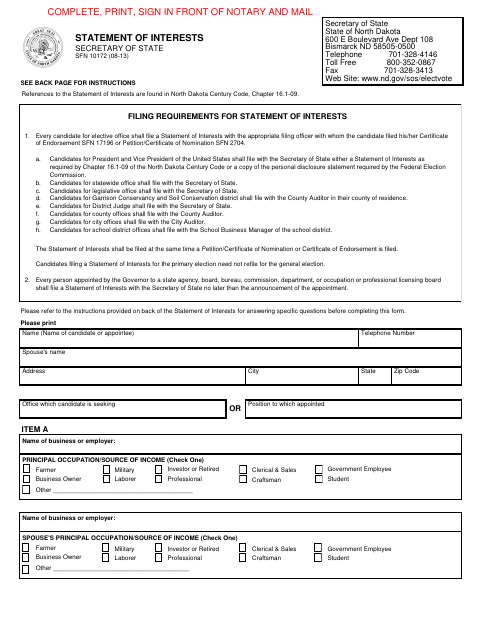
What this form is
The form collects information about the candidate’s and spouse’s occupations, financial interests, associations, and business or fiduciary relationships. Candidates for city office file it with the City Auditor at the same time as their nomination or endorsement paperwork; the form also applies to other candidates and certain gubernatorial appointees, who file with the officer listed in its instructions.
Who needs it
Candidates for city office in Taylor must file this form with the City Auditor alongside their nomination or endorsement paperwork.
Why it needs a notary
The form carries a jurat: the candidate or appointee signs and swears to the statement before a notarial officer, who completes the notarial certificate.
How to get this notarized
- 1
Download the Form
Get the Statement of Interests form and its instructions.
- 2
Complete the Form
Print and fill in the applicable occupation, financial interest, association, and business or fiduciary information. Add sheets in the same format if needed.
- 3
Book an Online Notary
Arrange a session with a commissioned online notary and have identification ready.
- 4
Sign on Video
Wait to sign until the notary directs you during the online session and administers the oath.
- 5
Submit to the City
File the completed form with the Taylor City Auditor alongside your nomination or endorsement paperwork.
Preview the form
The blank PDF straight from Taylor. Look it over, then upload your filled copy to start the notary session.

You’ll need ID and a webcam.
A licensed online notary will join you on video, verify your government-issued ID, witness your signature, and apply their seal. You’ll receive the notarized PDF by email when the session ends.
Frequently asked questions
- How do I get the Statement of Interests notarized online?
- Complete the form but wait to sign. Book a commissioned online notary, show identification, and sign during the video session while the notary administers the oath and completes the jurat.
- Do I need to file this form with the Taylor City Auditor?
- The form instructions say city candidates file their Statement of Interests with the City Auditor at the same time they file their nomination or endorsement paperwork.
- Can I add pages if the form does not have enough room?
- The instructions allow additional sheets in the same format for Items B, C, or D. Clearly identify which item each sheet continues and insert the sheets into the form.
- Does the form have to be signed in front of a notary?
- Yes. The form labels the affidavit “Sign before a commissioned Notary” and includes a subscribed-and-sworn jurat. North Dakota law authorizes remote notarization for its own notaries under N.D.C.C. §44-06.1-13.1 and recognizes qualifying acts by out-of-state notaries under §44-06.1-10; confirm with the city if unsure.