
Lyndhurst, OH · Cuyahoga County
Affidavit for Rental Registry Removal or Management Change
This affidavit lets a rental property owner or agent ask Lyndhurst to remove a property from its rental registry or record a change in management or agent.
- licensed online notary
- ~15 min average
- Notarized PDF emailed
What you’ll need
- Government-issued photo ID
- Webcam-enabled device (laptop or phone)
- This form, ready to upload as a PDF
What this form is
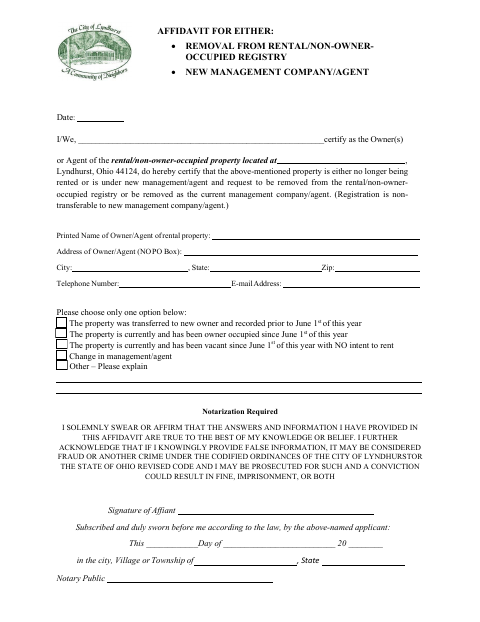
Use this form when a property is no longer being rented, has become owner-occupied or vacant, has transferred to a new owner, or has a new management company or agent. The owner or agent selects one reason, provides contact and property information, and swears or affirms that the answers are true. The form states that registration is not transferable to new management and requires notarization.
Who needs it
A rental property owner or agent seeking removal from Lyndhurst’s rental/non-owner-occupied registry or removal as the property’s current management company or agent needs this affidavit.
How to get this notarized
- 1
Download the Affidavit
Get the rental registry removal or management change affidavit from Lyndhurst.
- 2
Complete the Form
Enter the property and owner or agent information, then choose one reason and explain any other reason if selected.
- 3
Book an Online Notary
Arrange a remote session with a commissioned online notary for the required sworn statement.
- 4
Sign on Video
Sign and swear or affirm the affidavit during the online notary session.
- 5
Submit to Lyndhurst
Send the completed notarized affidavit to the city using its accepted submission method.
Preview the form
The blank PDF straight from Lyndhurst. Look it over, then upload your filled copy to start the notary session.

You’ll need ID and a webcam.
A licensed online notary will join you on video, verify your government-issued ID, witness your signature, and apply their seal. You’ll receive the notarized PDF by email when the session ends.
Frequently asked questions
- How do I complete this rental registry affidavit?
- Fill in the property and owner or agent details, select one reason for the request, and swear or affirm the statement before a notary. Submit the completed form to Lyndhurst.
- Do I need to sign this form in front of a notary?
- Yes. The form says notarization is required and includes a jurat stating that the affiant’s statement was subscribed and duly sworn before a notary.
- Can I sign the affidavit with a commissioned online notary?
- Ohio authorizes its notaries to perform online notarizations under R.C. §§147.60–147.66. Ask Lyndhurst whether it accepts this notarized form online; confirm with the city or village if unsure.
- Who can file this affidavit?
- The form identifies the signer as an owner or agent of the rental or non-owner-occupied property and provides a space for that person’s printed name and signature.