
Toronto, OH · Jefferson County
Automatic Bill Payment
Toronto water customers use this authorization to request automatic payment of monthly water bills from a bank account.
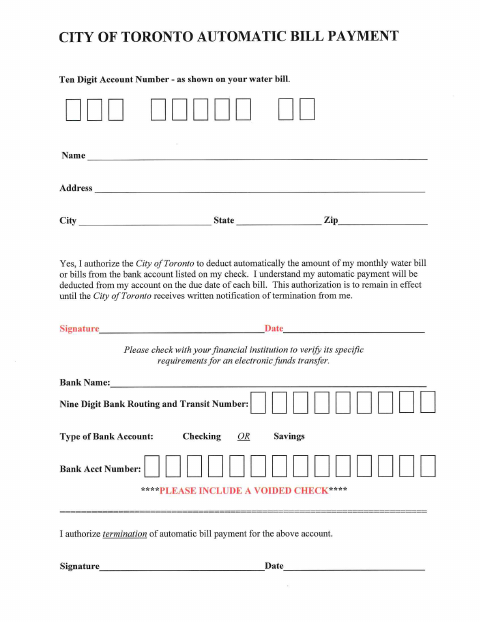
What this form is
This form authorizes the City of Toronto to deduct monthly water bill payments from the bank account the customer lists. It asks for the water account number, customer and bank details, and signatures and dates; it also includes a section to authorize termination. The form says payments are deducted on each bill’s due date and that termination requires written notice to the city.
Who needs it
Toronto water customers who want monthly bills paid automatically from a bank account can complete this authorization.
How to submit it
Include a voided check with the form. Submit it to the city department named on the form; check the city website for current contact details.
About notarization
This authorization is signed and dated without a notary; include a voided check, and the document does not identify any notarized or sworn attachment.
How to submit this form
- 1
Download the Form
Download the City of Toronto Automatic Bill Payment form.
- 2
Complete the Authorization
Enter your water account and contact details, bank information, and signature and date.
- 3
Gather the Attachment
Include a voided check as requested on the form.
- 4
Submit to the City
Submit the form to the city department named on it; check the city website for current contact details.
Frequently asked questions
- What does the Automatic Bill Payment form authorize?
- It authorizes the City of Toronto to deduct the amount of the customer’s monthly water bill or bills from the bank account listed on the form.
- What information and attachment does the form ask for?
- The form asks for a water account number, customer details, bank routing and account numbers, account type, and signatures and dates. It asks the customer to include a voided check.
- Do I need a notary for the Automatic Bill Payment form?
- No. The authorization is signed and dated without a notary. Include a voided check; the form does not identify any notarized or sworn attachment.
- How do I submit the Automatic Bill Payment form?
- Include a voided check and submit the form to the city department named on it. Check the City of Toronto website for current contact details.