
Waterville, OH · Lucas County
Occupancy Report
The Occupancy Report lets rental housing representatives report tenant move-ins and move-outs to the Waterville Tax Division.
What this form is
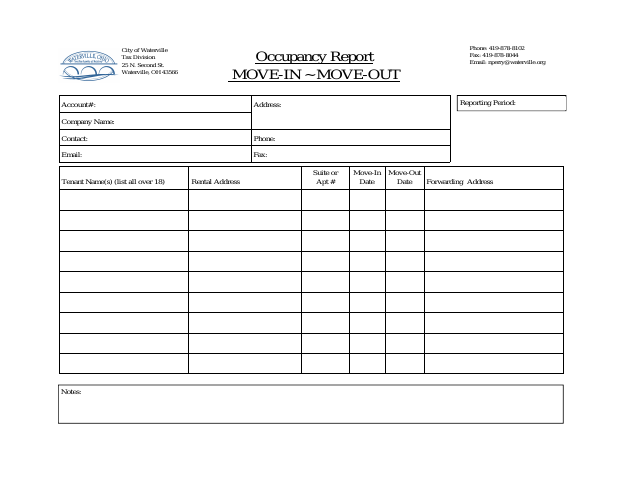
Use this report to provide the Waterville Tax Division with tenant move-in and move-out information for a rental address. It asks for account, property, company, and contact details, along with the reporting period and each tenant’s name, suite or apartment number, dates, forwarding address, and notes. The document does not state when the city requires it.
Who needs it
A rental housing representative with tenant move-in or move-out information can use this report to notify the Waterville Tax Division.
How to submit it
The form lists the Waterville Tax Division at 25 N. Second St., Waterville, OH 43566, and provides a fax number and email address for reporting.
About notarization
This report is completed without a notary; it lists no sworn attachment or related notarized step, so the filer just completes the report.
How to submit this form
- 1
Download The Report
Download the Occupancy Report PDF.
- 2
Complete The Report
Enter the account, property, company, contact, reporting-period, and tenant occupancy information requested.
- 3
Gather Attachments
The document does not list any attachments.
- 4
Submit The Report
Send it to the Waterville Tax Division using the mailing address, fax number, or email listed on the form.
Frequently asked questions
- What information does the Occupancy Report request?
- It requests account, address, company, and contact details, the reporting period, and tenant names, rental address, suite or apartment number, move-in and move-out dates, forwarding address, and notes.
- Who uses the Waterville Occupancy Report?
- Rental housing representatives can use the report to provide the Waterville Tax Division with information about tenant occupancy and changes.
- Do I need a notary for the Occupancy Report?
- No. The report has no notary block and lists no sworn attachment or notarized step; the filer just completes the report.
- How do I submit the Occupancy Report?
- The form lists the Waterville Tax Division mailing address, fax number, and email address for reporting. Use one of the contact methods shown on the form.