
Youngstown, OH · Mahoning County
Property Transfer Affidavit
This affidavit records property conditions, code violations, and the transfer of responsibility; an owner and buyer or transferee use it when a Youngstown property is subject to a compliance order or notice of violation.
- licensed online notary
- ~15 min average
- Notarized PDF emailed
What you’ll need
- Government-issued photo ID
- Webcam-enabled device (laptop or phone)
- This form, ready to upload as a PDF
What this form is
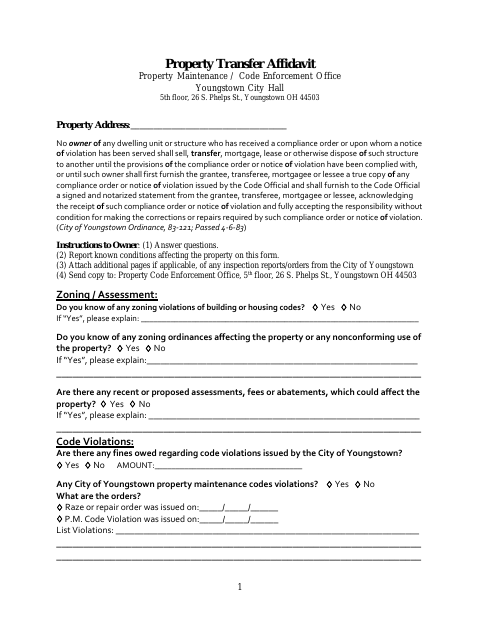
The form asks the owner to report known zoning, code, assessment, and fee issues and to provide information about the buyer or transferee. When a property subject to a compliance order or notice of violation is transferred, the form states that the buyer or transferee assumes responsibility for the city’s orders and swears that the information on the previous pages is complete and true. The owner sends a copy to Youngstown’s Property Code Enforcement Office.
Who needs it
Owners transferring a property subject to a Youngstown compliance order or notice of violation use this form, with the buyer or transferee completing the responsibility and sworn-statement sections.
Why it needs a notary
The form carries a jurat stating the buyer or transferee was duly sworn and subscribed before the notary; that person signs before the notary.
How to get this notarized
- 1
Download the Affidavit
Get the Property Transfer Affidavit and review the instructions and required information.
- 2
Fill In the Form
Enter the property details, report known conditions and violations, and complete the owner and buyer or transferee sections.
- 3
Book an Online Notary
Arrange a session with a commissioned online notary for the buyer or transferee’s sworn statement.
- 4
- 5
Submit to the City
Send a copy of the completed affidavit to Youngstown’s Property Code Enforcement Office as instructed on the form.
Preview the form
The blank PDF straight from Youngstown. Look it over, then upload your filled copy to start the notary session.

You’ll need ID and a webcam.
A licensed online notary will join you on video, verify your government-issued ID, witness your signature, and apply their seal. You’ll receive the notarized PDF by email when the session ends.
Frequently asked questions
- Do I need to notarize the Property Transfer Affidavit?
- Yes. The form includes a jurat for the buyer or transferee, who must swear that the information on the previous pages is complete and true and sign before a notary.
- How do I complete the affidavit online?
- Fill in the property and condition details, then book a commissioned online notary. The buyer or transferee signs during the video session and submits the completed form to the city.
- Can I use online notarization for this form?
- Ohio authorizes online notarization by its own notaries under R.C. §§147.60–147.66. Check with Youngstown about its submission process; confirm with the city or village if unsure.
- Where do I send the completed form?
- The form instructs the owner to send a copy to the Property Code Enforcement Office, fifth floor, 26 S. Phelps St., Youngstown, OH 44503.