
Fort Recovery, OH · Mercer County
Automatic Payment Authorization Form
This form lets Fort Recovery utility customers authorize monthly deductions from a checking or savings account to pay their bills.
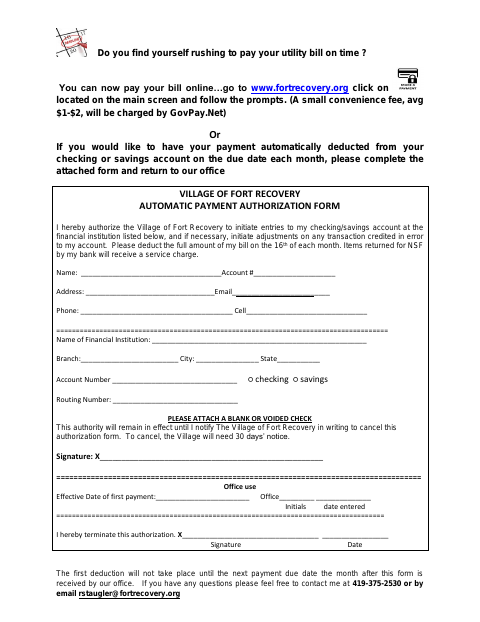
What this form is
Fort Recovery utility customers can use this form to authorize the Village to deduct the full bill amount from a checking or savings account on the 16th of each month. Complete it to start automatic payments and return it to the Village office. The form requests customer and bank details, account type, routing number, and a signature; it also asks for a blank or voided check.
Who needs it
Fort Recovery utility customers who want their bill automatically deducted from a checking or savings account should complete this form.
How to submit it
Attach a blank or voided check and return the completed form to the Village office. The document lists a phone number and email for questions, but does not provide an office address.
About notarization
This form does not require a notary; attach a blank or voided check, then sign and date the authorization.
How to submit this form
- 1
Download The Form
Download the Automatic Payment Authorization Form.
- 2
Complete The Form
Fill in your contact details, financial institution, account type, account number, and routing number.
- 3
Gather The Attachment
Attach a blank or voided check, as requested on the form.
- 4
Sign And Return
Sign the authorization and return it with the check to the Village office.
Frequently asked questions
- What does the Automatic Payment Authorization Form do?
- It authorizes the Village of Fort Recovery to deduct the full utility bill amount from a checking or savings account on the 16th of each month.
- What should I attach to the form?
- The form asks you to attach a blank or voided check and provide your financial institution, account, and routing information.
- Do I need a notary for the Automatic Payment Authorization Form?
- No. The form does not require a notary; attach a blank or voided check, then sign and date the authorization.
- How do I submit the Automatic Payment Authorization Form?
- Complete and sign the form, attach a blank or voided check, and return it to the Village office. The document does not give an office address.