
Clayton, OH · Montgomery County
Planning Commission Application
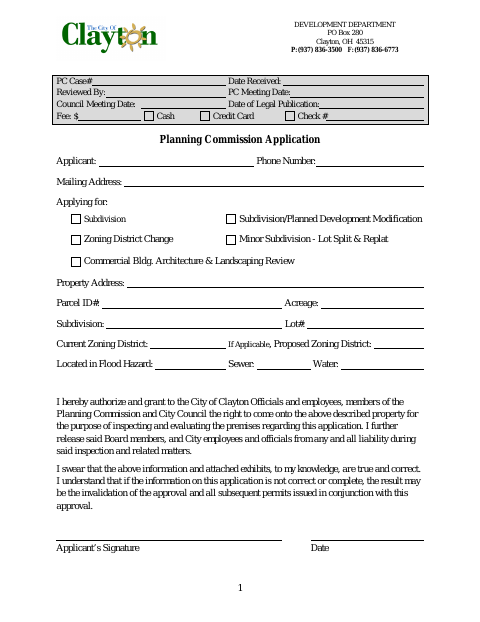
Clayton property owners and applicants use this form to request subdivision, planned development, zoning district change, lot split, replat, or commercial building architecture and landscaping review.
- licensed online notary
- ~15 min average
- Notarized PDF emailed
What you’ll need
- Government-issued photo ID
- Webcam-enabled device (laptop or phone)
- This form, ready to upload as a PDF
What this form is
The application collects applicant and property details, identifies the type of request, and authorizes city officials, employees, and commission and council members to inspect the property. The property owner affidavit confirms ownership, that the owner has reviewed the application, and that the owner consents to the request. Submit the form for the applicable Planning Commission review; the city provides fields for case details, fees, and meeting dates.
Who needs it
Applicants seeking a listed Planning Commission review for a Clayton property need the application, and the property owner must complete the accompanying affidavit.
How to get this notarized
- 1
Download the Application
Get the Planning Commission Application from the City of Clayton and review both pages.
- 2
Fill Out the Form
Enter the applicant and property details, select the requested review, and complete the owner affidavit.
- 3
- 4
Sign on Video
Each property owner signing the affidavit completes the notarial signing during the video session.
- 5
Submit to the City
Submit the completed application and notarized affidavit to the City of Clayton for review.
Preview the form
The blank PDF straight from Clayton. Look it over, then upload your filled copy to start the notary session.

You’ll need ID and a webcam.
A licensed online notary will join you on video, verify your government-issued ID, witness your signature, and apply their seal. You’ll receive the notarized PDF by email when the session ends.
Frequently asked questions
- How do I complete the notarized property owner affidavit?
- Complete the application and affidavit, then sign the property owner signature line in front of a notary. The affidavit states that the owner has reviewed the application and consents to the request.
- Do I need to notarize the Planning Commission application?
- The application includes an owner affidavit with a sworn statement and a notary section. The property owner or owners signing that affidavit must sign before a notary; confirm with the city or village if unsure.
- Can I use online notarization for this form?
- Ohio authorizes online notarization by a commissioned online notary under R.C. §§147.60–147.66. Ask the City of Clayton whether it accepts this application with an online notarization.
- Who signs the affidavit?
- The form’s affidavit is for the owner or owners of the described real estate. Each signing owner swears to the statements and signs before the notary.