
Cherokee, OK · Alfalfa County
Solicitor/Peddler/Itinerant Merchant License Application
This application requests a solicitor, peddler, itinerant merchant, or transient vendor license from the City of Cherokee and is completed by the applicant or a business representative.
- licensed online notary
- ~15 min average
- Notarized PDF emailed
What you’ll need
- Government-issued photo ID
- Webcam-enabled device (laptop or phone)
- This form, ready to upload as a PDF
What this form is
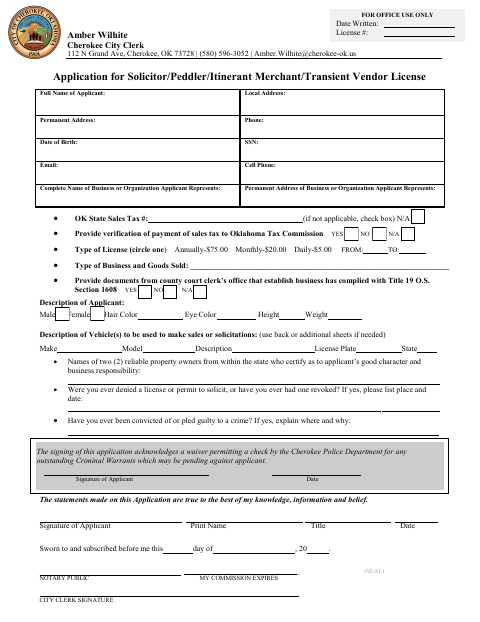
The application collects the applicant’s contact and identifying information, business details, license term, goods sold, vehicle description, and character references. It also asks about prior license denials or revocations and criminal convictions. Applicants use it to request an annual, monthly, or daily license from the City of Cherokee and provide the listed sales-tax and county-court-clerk information, as applicable.
Who needs it
Anyone applying to sell goods or solicit business in Cherokee as a solicitor, peddler, itinerant merchant, or transient vendor should complete this application.
Why it needs a notary
The form carries a sworn and subscribed jurat; the applicant signs the application before the notary, who completes the date, commission expiration, and seal.
How to get this notarized
- 1
Download The Application
Get the solicitor, peddler, itinerant merchant, or transient vendor license application from the City of Cherokee.
- 2
Complete The Form
Fill in applicant and business information, select a license term, and provide the requested vehicle, reference, and supporting details.
- 3
Book An Online Notary
Schedule a remote appointment with a commissioned online notary to complete the application’s jurat.
- 4
Sign On Video
Wait to sign until you are with the notary by video; the notary completes the jurat and notarial details.
- 5
Submit To The City
Send the completed application and any applicable supporting information to the City Clerk according to the city’s instructions.
Preview the form
The blank PDF straight from Cherokee. Look it over, then upload your filled copy to start the notary session.

You’ll need ID and a webcam.
A licensed online notary will join you on video, verify your government-issued ID, witness your signature, and apply their seal. You’ll receive the notarized PDF by email when the session ends.
Frequently asked questions
- How do I submit the Cherokee license application?
- Complete the application, sign it before a commissioned online notary, and submit it to the City Clerk using the city’s instructions. Include any applicable supporting information requested on the form.
- Do I need to sign this application before a notary?
- Yes. The form includes a sworn and subscribed jurat, so the applicant signs before the notary, who completes the notarial section.
- Can I sign the application with an online notary?
- Oklahoma authorizes remote online notarization by eligible notaries who separately register with the Secretary of State. Under 49 O.S. §115, an authorized notarial act performed in another state has the same effect as an Oklahoma notarial act.
- What information and documents does the application request?
- It asks for applicant and business details, license type and dates, goods sold, vehicle information, character references, and answers about prior license actions or convictions. It also requests sales-tax verification and county court clerk documents when applicable; confirm with the city or county clerk if unsure.