
Roseburg, OR · Douglas County
Land Use Action Owner Authorization
This form lets a property owner authorize an agent to act and sign on the owner’s behalf in matters related to a City of Roseburg land use application.
- licensed online notary
- ~15 min average
- Notarized PDF emailed
What you’ll need
- Government-issued photo ID
- Webcam-enabled device (laptop or phone)
- This form, ready to upload as a PDF
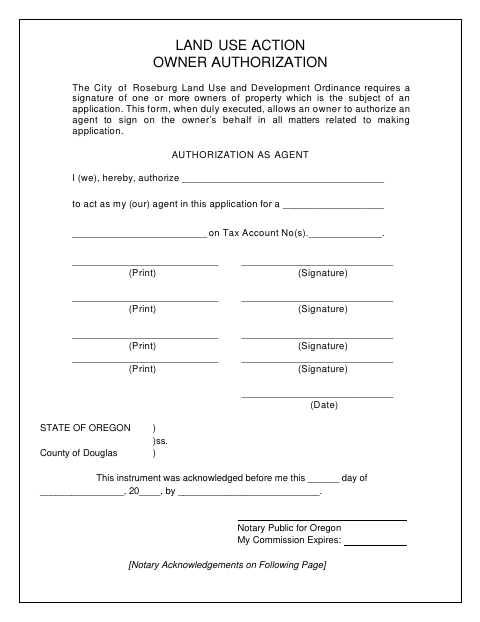
What this form is
The form identifies the authorized agent, the application type, and the property tax account number, and provides spaces for owners to sign. The City of Roseburg requires one or more property owners’ signatures for a land use application; use this authorization when an owner wants an agent to act on the owner’s behalf. The form also explains how other owners may be notified and how a timely objection can affect the application.
Who needs it
A property owner who wants an agent to act or sign on the owner’s behalf in matters related to a City of Roseburg land use application needs this form.
Why it needs a notary
The form carries an acknowledgment block; each owner signing the authorization must acknowledge their signature before a notary, using a separate block when needed.
How to get this notarized
- 1
Download the Form
Get the Land Use Action Owner Authorization from the City of Roseburg.
- 2
Fill In the Details
Enter the agent, application type, and tax account number; each authorizing owner should print and sign.
- 3
Book an Online Notary
Arrange an appointment with a commissioned online notary for the owner or owners signing.
- 4
Sign on Video
Complete the acknowledgment with the notary during the online video session.
- 5
Submit to the City
Send the completed authorization with the land use application to the City of Roseburg.
Preview the form
The blank PDF straight from Roseburg. Look it over, then upload your filled copy to start the notary session.

You’ll need ID and a webcam.
A licensed online notary will join you on video, verify your government-issued ID, witness your signature, and apply their seal. You’ll receive the notarized PDF by email when the session ends.
Frequently asked questions
- How do I complete the Land Use Action Owner Authorization?
- Enter the agent’s name, application type, and tax account number, then have each signing owner complete the authorization and acknowledge their signature before a notary.
- Do I need to notarize this authorization?
- Yes. The form includes acknowledgment blocks for owners’ signatures. Each owner signing should acknowledge their signature before a notary.
- Can I use a commissioned online notary for this form?
- Oregon law authorizes remote notarization by Oregon notaries under ORS 194.277 and recognizes qualifying acts performed by authorized notaries in another state under ORS 194.260. The Oregon Secretary of State says a properly notarized out-of-state remote online notarization is valid in Oregon.
- What happens if another property owner objects?
- The form says other owners, purchasers, or lessees of record may be notified if required signatures are missing. A timely objection within 15 days of notice may cause the Director to deem the application withdrawn.