
Trainer, PA · Delaware County
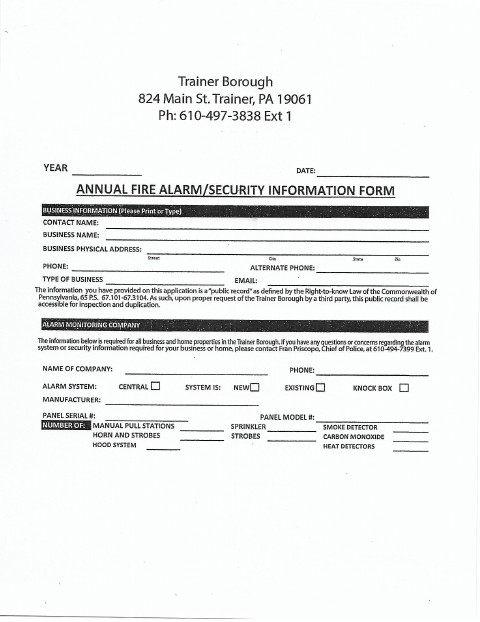
Annual Fire Alarm and Security Information Form
Trainer Borough’s annual fire alarm and security information form is for businesses and home properties in the borough to provide property and alarm system details.
What this form is
Trainer Borough’s annual form collects contact and business or property information, along with details about an alarm system and its components. The document says the requested information is required for all business and home properties in the borough. It also explains that the information is a public record and may be available for inspection and duplication upon a proper request.
Who needs it
Owners or contacts for business and home properties in Trainer Borough need this form to provide the requested alarm and security information.
How to submit it
Submit it to the city department named on the form; check the city website for current contact details.
About notarization
No notary is required; the form requests a year and date, and lists no sworn attachment or notarized step.
How to submit this form
- 1
Download The Form
Download the Annual Fire Alarm and Security Information Form.
- 2
Complete Property Details
Provide the requested contact, business or property, and alarm system information.
- 3
Check Your Information
Review the entries, including the year and date requested on the form.
- 4
Submit To The City
Submit it to the city department named on the form; check the city website for current contact details.
Frequently asked questions
- What does the Annual Fire Alarm and Security Information Form collect?
- It asks for contact and business or property information, plus details about the alarm system, monitoring company, and listed system components.
- Who needs to complete this form?
- The form says the information is required for all business and home properties in Trainer Borough.
- Do I need a notary for this form?
- No. The form requests a year and date and lists no sworn attachment or notarized step.
- How do I submit the form?
- The document does not specify how to submit it. Submit it to the city department named on the form; check the city website for current contact details.