
Conshohocken, PA · Montgomery County
Residential Contractor Registration
This form lets residential contractors apply for, renew, or update a Borough of Conshohocken registration, providing business, applicant, insurance, and contact details.
- licensed online notary
- ~15 min average
- Notarized PDF emailed
What you’ll need
- Government-issued photo ID
- Webcam-enabled device (laptop or phone)
- This form, ready to upload as a PDF
What this form is
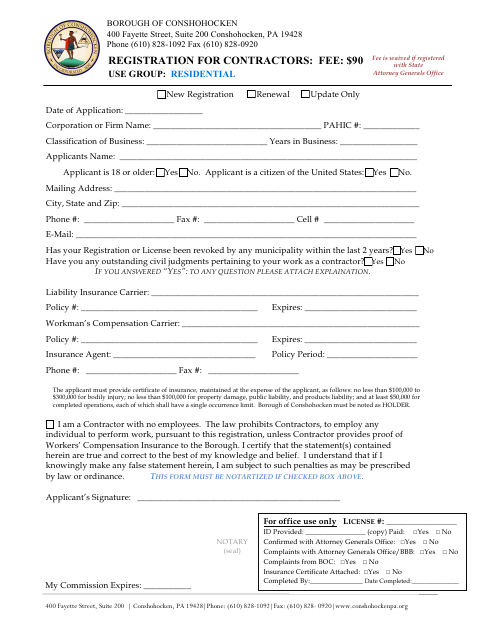
Residential contractors use this form to apply for a new registration, renew one, or update registration information with the Borough of Conshohocken. Applicants provide business and contact details, answer questions about prior license revocations and civil judgments, and provide insurance information and a certificate of insurance. The form requires notarization only when the applicant checks the box stating they are a contractor with no employees.
Who needs it
Residential contractors applying for, renewing, or updating a Conshohocken registration should complete this form and provide the requested business and insurance details.
Why it needs a notary
The form has a notary seal and commission-expiration block; the applicant signs before a notary only if they check the no-employees box.
How to get this notarized
- 1
Download the Form
Get the Residential Contractor Registration form from the Borough of Conshohocken.
- 2
Fill In Your Information
Complete the registration, applicant, business, contact, and insurance fields; attach explanations for any yes answers to the specified questions.
- 3
Book an Online Notary
If you check the no-employees box, arrange a session with a commissioned online notary.
- 4
Sign on Video
For the required notarization, sign the form during your online notary session and have the notary complete the notary block.
- 5
Submit to the Borough
Send the completed registration and requested insurance certificate to the Borough of Conshohocken.
Preview the form
The blank PDF straight from Conshohocken. Look it over, then upload your filled copy to start the notary session.

You’ll need ID and a webcam.
A licensed online notary will join you on video, verify your government-issued ID, witness your signature, and apply their seal. You’ll receive the notarized PDF by email when the session ends.
Frequently asked questions
- How do I complete the Residential Contractor Registration?
- Choose whether you are applying for a new registration, renewal, or update, then enter the requested applicant, business, contact, and insurance information. Attach explanations for any yes answers to the revocation or judgment questions.
- Do I need to notarize this contractor registration?
- The form says notarization is required if you check the box stating you are a contractor with no employees. If you check that box, sign before a notary and have the notary complete the seal and commission-expiration block.
- Can I sign the form with an online notary?
- Pennsylvania authorizes its notaries to perform remote online notarizations under 57 Pa.C.S. §306.1. A commissioned online notary can notarize your signature by video when the form requires notarization.
- What insurance information and documents does the form request?
- The form asks for liability and workers’ compensation carrier and policy information, insurance agent details, and a certificate of insurance. It states that the Borough of Conshohocken must be listed as the certificate holder.
- Where should I submit the completed registration?
- The form lists the Borough of Conshohocken at 400 Fayette Street, Suite 200, Conshohocken, PA 19428. Confirm with the city, borough or township if unsure about current submission instructions.