
Red Hill, PA · Montgomery County
Commercial Fire Safety Inspection Application
Businesses use this application to provide Red Hill with business, owner, emergency contact, and fire protection information for a commercial fire safety inspection.
What this form is
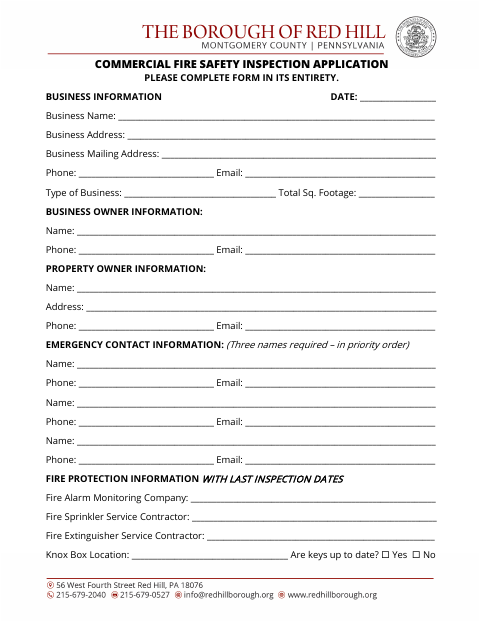
This application collects information about a business and its owners, emergency contacts, and fire protection arrangements for a commercial fire safety inspection. It asks for the business address, contact details, type of business, total square footage, three emergency contacts in priority order, fire service providers, Knox Box location, and whether keys are up to date. The form instructs applicants to complete it in its entirety.
Who needs it
A business providing information for a commercial fire safety inspection in Red Hill can use this application.
How to submit it
Submit it to the city department named on the form; check the city website for current contact details.
About notarization
This application is signed without a notary; it lists no notarized or sworn attachment, so the signer just signs and dates it.
How to submit this form
- 1
Download The Application
Download the Commercial Fire Safety Inspection Application.
- 2
Complete The Form
Complete the form in its entirety, including business, owner, emergency contact, and fire protection information.
- 3
Gather Attachments
The application does not list any attachments to gather.
- 4
Submit To The City
Submit it to the city department named on the form; check the city website for current contact details.
Frequently asked questions
- What information does the Commercial Fire Safety Inspection Application request?
- It requests business, business owner, property owner, and emergency contact details, plus fire protection information, the Knox Box location, and key status.
- Who uses this application?
- Businesses can use the application to provide information for a commercial fire safety inspection in Red Hill.
- Do I need a notary for the Commercial Fire Safety Inspection Application?
- No. This application is signed without a notary; it lists no notarized or sworn attachment, so the signer just signs and dates it.
- How do I submit the Commercial Fire Safety Inspection Application?
- Submit it to the city department named on the form; check the city website for current contact details.