
Charleston, SC · Charleston County
Residential Short-Term Rental Application
This notarized application is for Charleston property owners seeking approval to operate, renew, or change ownership of a residential short-term rental, and must be submitted with the required supporting documents.
- licensed online notary
- ~15 min average
- Notarized PDF emailed
What you’ll need
- Government-issued photo ID
- Webcam-enabled device (laptop or phone)
- This form, ready to upload as a PDF
What this form is
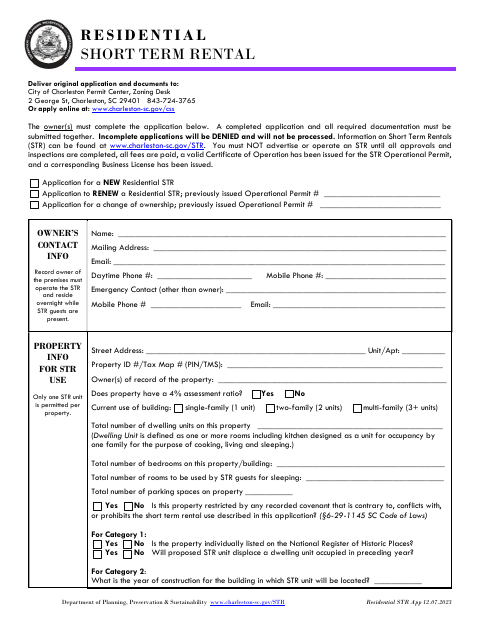
The application collects owner and property details, rental and building information, and sworn statements about eligibility and planned operation. Owners submit it with the required supporting documents for a new residential short-term rental, renewal, or ownership change. The city reviews applications through zoning and fire safety steps; a separate business license application is also required. The form says the rental must not be advertised or operated until approvals and inspections are complete, fees are paid, and the required certificate and business license are issued.
Who needs it
A record owner applying to operate, renew, or change ownership of a residential short-term rental in Charleston must complete and submit this application with the required documents.
Why it needs a notary
The owner listed on page one signs the sworn affidavit before a notary; the form provides a state-jurat block beginning “Sworn to me” and a commission-expiration line.
How to get this notarized
- 1
Download The Application
Get the Residential Short-Term Rental Application from the City of Charleston.
- 2
Complete The Form
Fill in owner, property, rental, and building information, and gather all required supporting documents.
- 3
Book An Online Notary
Arrange a session with a commissioned online notary for the owner who must sign the sworn affidavit.
- 4
Sign On Video
Follow the notary’s instructions and sign the affidavit during the online session.
- 5
Submit To The City
Submit the completed notarized application, fee, and required documents to Charleston Zoning or through the city’s online portal.
Preview the form
The blank PDF straight from Charleston. Look it over, then upload your filled copy to start the notary session.

You’ll need ID and a webcam.
A licensed online notary will join you on video, verify your government-issued ID, witness your signature, and apply their seal. You’ll receive the notarized PDF by email when the session ends.
Frequently asked questions
- How do I apply for a Charleston residential short-term rental?
- Complete the application, gather the required documents, and submit them with the fee to the city’s Zoning Desk or through its online portal. Submit the business license application separately to Revenue Collections.
- Do I need to sign the application in front of a notary?
- Yes. The checklist requires a completed, notarized application, and the owner listed on page one must sign the sworn affidavit before a notary.
- Can I use a commissioned online notary for this form?
- South Carolina requires the principal to appear in person for an in-state electronic notarization. A notarial certificate valid under federal law or the law where it was made may be sufficient in South Carolina; confirm with the city or town if unsure.
- When may I advertise or operate the rental?
- The form says not to advertise or operate until all approvals and inspections are complete, fees are paid, and a valid Certificate of Operation and corresponding Business License have been issued.