
Edisto Beach, SC · Colleton County
Affidavit of Non-Conversion Statement
This agreement records a property owner’s flood-zone restrictions for a structure in a Special Flood Hazard Zone and is submitted to the Town of Edisto Beach and Colleton County Register of Deeds.
- licensed online notary
- ~15 min average
- Notarized PDF emailed
What you’ll need
- Government-issued photo ID
- Webcam-enabled device (laptop or phone)
- This form, ready to upload as a PDF
What this form is
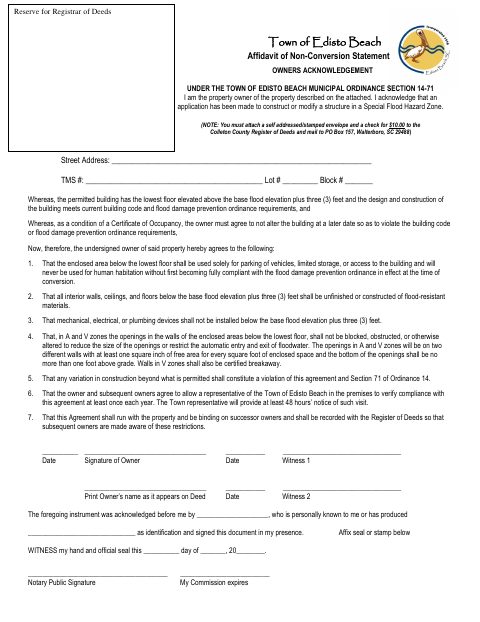
The owner agrees that the area below the building’s lowest floor will not be used for human habitation unless brought into compliance with applicable flood damage prevention requirements. The agreement also sets restrictions on finishes, utilities, flood openings, and future alterations, and allows annual town compliance visits with advance notice. The form says it must be recorded with the Register of Deeds and notes that a $10 check and a self-addressed stamped envelope must accompany the submission.
Who needs it
A property owner applying to construct or modify a structure in a Special Flood Hazard Zone must sign this agreement as a condition of receiving a Certificate of Occupancy.
Why it needs a notary
The form has an acknowledgment block stating the owner signed in the notary’s presence; the owner named in the block signs before the notary.
How to get this notarized
- 1
Download the Agreement
Get the Town of Edisto Beach Affidavit of Non-Conversion Statement.
- 2
Fill In the Property Details
Enter the street address, TMS number, lot, and block, and review the owner obligations.
- 3
Book an Online Notary
Arrange an appointment with a commissioned online notary and check acceptance requirements before the session.
- 4
Sign on Video
Show identification and sign the agreement in the notary’s presence during the video appointment.
- 5
Submit for Recording
Follow the form’s instructions for sending the notarized agreement, $10 check, and self-addressed stamped envelope to the Register of Deeds.
Preview the form
The blank PDF straight from Edisto Beach. Look it over, then upload your filled copy to start the notary session.

You’ll need ID and a webcam.
A licensed online notary will join you on video, verify your government-issued ID, witness your signature, and apply their seal. You’ll receive the notarized PDF by email when the session ends.
Frequently asked questions
- How do I submit the signed agreement?
- The form says the agreement must be recorded with the Colleton County Register of Deeds. It also instructs you to include a $10 check and a self-addressed stamped envelope and mail the materials to the listed address.
- Do I need to sign the agreement before a notary?
- Yes. The form includes an acknowledgment stating that the owner signed the document in the notary’s presence. Wait to sign until you are with the notary.
- Can I use a commissioned online notary?
- South Carolina requires the principal to appear in person before its own notaries for electronic notarization. South Carolina law recognizes qualifying out-of-state notarial acts; confirm acceptance and recording arrangements with the city or county before booking.
- Can the agreement be submitted by e-recording?
- The form directs owners to record the agreement with the Register of Deeds. E-recording depends on county support and is usually handled through a title company; confirm with the city or town if unsure.